


Do you have multiple websites but hate paying for separate SSL certificates for each one? That is a waste of money and time. A GoDaddy SAN certificate lets you secure up to 100 domains under a single plan, saving you hundreds of dollars a year.
But here is the catch: most people buy the wrong type or forget to add the ‘www’ version of their domains. That mistake can break your site’s security and scare away customers. Let me show you exactly how to get this right.
What Is a GoDaddy SAN Certificate and Why You Need It
A GoDaddy SAN (Subject Alternative Name) certificate, also called a Multi-Domain UCC, protects multiple domain names and their subdomains with one SSL. For example, you can secure your main site, a blog, and an online store all under the same certificate. This is perfect for small business owners who run several websites or use Microsoft Exchange Server.
GoDaddy offers three validation levels: Domain Validated (DV) for basic encryption, Organization Validated (OV) for business verification, and Extended Validation (EV) for the highest trust. All use SHA-2 and 2048-bit encryption, which is the industry standard in 2026. Prices start around $69.99 per year for a 5-domain plan, and you can add more domains for a fee.
One critical rule: since September 2020, SSL certificates cannot last longer than 13 months (397 days). So you will need to renew yearly. Also, if you change your domain list, GoDaddy issues a new certificate file, and the old one stops working after 72 hours. Install the new file right away to avoid downtime.
Secure Your Digital Empire: GoDaddy’s SAN Certificate Explained
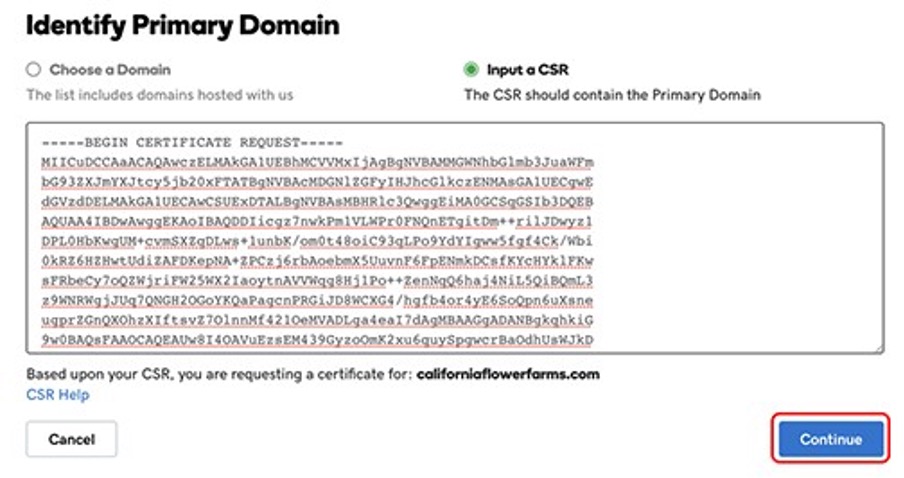
In 2026, managing multiple websites means you need a smart security solution. GoDaddy’s SAN (Subject Alternative Name) Certificate, also known as a Multi-Domain UCC, is designed precisely for this. It lets you protect many different web addresses and their subdomains with just one SSL certificate. This is a major win for saving money and simplifying how you manage your online presence.
A standard SAN certificate covers five websites, including your main one and four others. You can easily add more, up to 100 websites, all managed from a single GoDaddy dashboard. This makes it a powerful tool for businesses with a broad online reach. All GoDaddy SAN certificates use strong 2048-bit encryption and SHA-2, meeting today’s security needs.
| Feature | Details |
| Name | GoDaddy SAN Certificate (Multi-Domain UCC) |
| Coverage | 1 Primary Domain + up to 99 SANs |
| Encryption | SHA-2, 2048-bit |
| Validation Types | DV, OV, EV |
| Optimization | Shared Hosting, Microsoft Exchange/LCS |
| Cost Savings | Consolidates multiple certificates |
| Management | Single GoDaddy Dashboard |
| Update Rule | New certificate issued after SAN changes (72-hour effect) |
| Certificate Validity | Max 13 months (397 days) |
GoDaddy SAN Certificate for Multiple Domains
This certificate is your key to consolidating security for a diverse digital footprint. It allows you to secure not just your main website but also several other distinct domain names and their associated subdomains. Think of it as a master key for your online properties, simplifying management and reducing the complexity of tracking multiple individual certificates.
Read also: Still Available: Short .com Names That Build Trust in 2026
The primary advantage is the unified management. Instead of logging into different systems for each website’s security, you handle it all from one place. This is especially beneficial for businesses that operate multiple brands or services online, each requiring its own secure connection.
Multi-Domain SSL Certificate Benefits
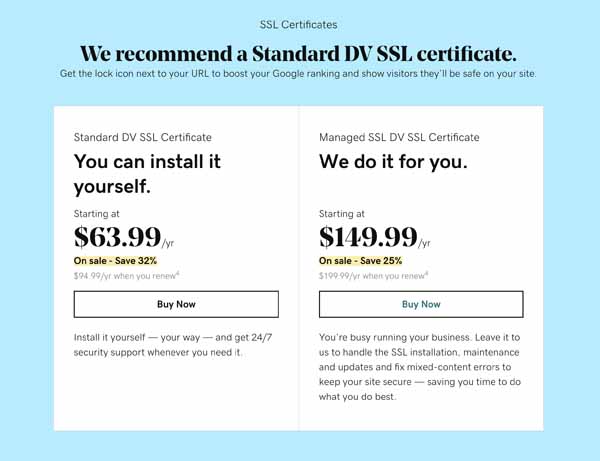
The benefits of a Multi-Domain SSL Certificate are significant for any growing online business. It offers substantial cost savings by bundling multiple domain protections into one purchase. Furthermore, it streamlines the renewal process and simplifies the management of your security infrastructure, freeing up valuable time and resources.
Imagine the ease of having one renewal date and one dashboard to monitor all your secured sites. This efficiency is crucial in today’s fast-paced digital environment, allowing you to focus more on your business operations and less on administrative tasks.
A key functional aspect is the visibility: while the primary domain is prominently displayed, other secured sites share the certificate’s backend infrastructure without explicit outward connection indicators to visitors unless they inspect the technical certificate details.
Unified Communications Certificate Explained
A Unified Communications Certificate (UCC) is essentially GoDaddy’s branding for its SAN SSL Certificate. It’s specifically optimized for environments like Microsoft Exchange Server and Live Communications Server. This means it’s built to handle the complex needs of communication platforms that often use multiple internal and external domain names.
Read also: Buy Multi Domain SSL: Top 10 Cheapest Options Compared for 2026
If your organization relies heavily on Microsoft’s communication tools, a UCC certificate ensures seamless and secure operation. It provides the necessary encryption and validation for all the domains involved in your unified communications setup.
SAN SSL Certificate vs Wildcard SSL
It is important to understand the difference between a SAN SSL Certificate and a Wildcard SSL Certificate. A SAN certificate is designed to secure a specific list of different domain names. A Wildcard certificate, on the other hand, secures a single domain and an unlimited number of its first-level subdomains (e.g., *.yourdomain.com).
While a Wildcard certificate is excellent for protecting all subdomains under one main domain, a SAN certificate offers broader flexibility. It allows you to protect completely different domain names (like example.com, anothersite.net, and a third.org) all under one certificate, which a Wildcard cannot do.
GoDaddy SSL Certificate Installation
The installation process for a GoDaddy SSL Certificate, particularly a SAN certificate, requires careful attention. While GoDaddy offers managed options, manual installation involves obtaining the certificate files and uploading them to your web server. This process can vary depending on your hosting environment and server type.
A critical point to remember is the ’72-Hour Rule’. Any change to your list of SAN domains triggers the issuance of a new certificate. You must install this new certificate within 72 hours of it becoming available, as the old one will become inoperative. Prompt action is essential to maintain uninterrupted security.
It’s critical to note the ’72-Hour Rule’: any alteration to the domain list triggers the issuance of a brand-new certificate file, rendering the legacy certificate inoperative exactly 72 hours after the new one becomes available. Prompt installation of the new certificate file on the server is mandatory.
Wildcard SSL Certificate for Subdomains
A Wildcard SSL Certificate is a specialized tool for securing numerous subdomains under a single main domain. For instance, if you have a website like yourbusiness.com, a Wildcard certificate can secure shop.yourbusiness.com, blog.yourbusiness.com, and mail.yourbusiness.com all at once. This is incredibly convenient if you frequently add new subdomains.
However, it’s important to note that a Wildcard certificate only covers the first level of subdomains. It will not cover subdomains of subdomains (e.g., support.mail.yourbusiness.com). For broader coverage across different main domains, a SAN certificate is the better choice.
Multi-Domain UCC Certificate Use Cases
The Multi-Domain UCC Certificate is ideal for a variety of scenarios. Small businesses with multiple product lines or service websites can use it to secure each one efficiently. Web developers managing client websites often find it cost-effective to use a single UCC to cover all their clients’ sites.
E-commerce platforms that operate distinct storefronts under different domain names also benefit greatly. Essentially, any entity managing more than one online identity can leverage the consolidation and cost benefits of a Multi-Domain UCC certificate.
Subject Alternative Name SSL Setup
Setting up a Subject Alternative Name SSL certificate involves specifying all the domain names you wish to secure. When you add or remove domains from your SAN list, GoDaddy issues a new certificate. It is vital to list both the standard domain and its ‘www.’ variant if you want both secured (e.g., example.net and www.example.net must be listed separately).
The process is managed through your GoDaddy Account Dashboard. Understanding the implications of the 72-hour rule for new certificate issuance is key to a smooth setup and ongoing management of your security.
Since September 1, 2020, SSL/TLS certificates cannot be issued for periods longer than 13 months (397 days), a regulation that continues to apply in 2026. GoDaddy offers two primary plans: the ‘GoDaddy Multi-domain SAN SSL (Standard)’ for manual setup and the ‘GoDaddy Managed SAN SSL Certificate’ for an automated, hands-off experience including a 90-day encryption refresh cycle.
The Expert Verdict: Future-Proofing Your Online Security in 2026
In 2026, the GoDaddy SAN Certificate, or Multi-Domain UCC, remains an essential tool for digital security. Its ability to consolidate multiple domain protections into a single, manageable certificate offers unparalleled efficiency and cost-effectiveness. As businesses continue to expand their online presence across various domains and subdomains, the demand for such unified solutions will only grow.
While the technicalities of certificate management, like the 72-hour rule for updates, require diligence, the overall value proposition is clear. For anyone managing more than one website, investing in a SAN certificate is not just a security measure; it’s a strategic decision that simplifies operations and strengthens your brand’s trustworthiness across the digital landscape. This type of Multi-Domain SSL Certificate is a smart choice for robust online protection.
Read also: Stop Wasting Money: One SSL Covers All Subdomains
Your 3-Step Action Plan for GoDaddy SAN SSL
Step 1: Audit Your Domains
List every domain and subdomain you need to secure. Remember to include both the root and www versions for each external domain.
This prevents gaps in coverage that could trigger browser warnings.
Step 2: Choose Your Tier and Plan
Select DV for basic validation, OV for business credibility, or EV for maximum trust. Decide between manual setup or the Managed SAN SSL for automated renewals.
The Managed plan includes a 90-day encryption refresh, reducing your maintenance workload.
Step 3: Install Promptly After Changes
After adding or removing a SAN, immediately download and install the new certificate file. The old certificate stops working exactly 72 hours later.
Set a calendar reminder to avoid site downtime during this transition window.
Frequently Asked Questions
Can I secure unlimited subdomains with one SAN certificate?
No, GoDaddy SAN certificates cover a set number of domains (starting at 5) and their subdomains. You can purchase additional SAN slots up to 100 total.
Each subdomain of a listed domain is automatically secured, but separate domains require explicit listing.
Will visitors see all my secured domains on the trust seal?
No, only the primary domain is displayed on the GoDaddy seal and in the browser’s ‘Issued To’ field. Other domains share the same certificate but are not publicly listed.
Technical users can view all SANs by inspecting the certificate details.
What happens if I miss the 72-hour installation window?
Your old certificate becomes invalid, and your sites will show security errors. Install the new certificate immediately to restore trust.
GoDaddy does not extend the grace period, so proactive installation is critical.
GoDaddy SAN certificates offer a proven, cost-effective way to secure multiple sites under one roof, backed by industry-standard encryption and flexible validation tiers. This is a smart choice for anyone managing a growing online portfolio.
Ready to simplify your SSL management? Review your domain list, select your plan, and set up your dashboard today.
With automated options like Managed SAN SSL, you can focus on your business while your encryption stays fresh and your visitors stay safe.
