


Struggling to get your office phone working on your laptop? You are not alone. Many people hit a wall when trying to download Bria Enterprise for work.
The right download link is just the first step. You also need an active account and the correct installer for your device.
Where to Find the Bria Enterprise Download Link for Your Computer or Phone
For desktop computers, you usually get the installer from your company’s Bria Enterprise Portal. Your IT team will give you the web address and your login credentials.
Mobile apps are easier. Just go to the Apple App Store for iPhone or Google Play Store for Android and search for ‘Bria Enterprise’. The app is free to download, but you still need a work account to sign in.
If you are testing the software on your own, CounterPath offers a 21-day free trial for Bria Solo or Bria Teams. But remember, Bria Enterprise itself requires an account from your employer or service provider.
Bria Enterprise Download: Your 2026 Communication Hub

Get the latest Bria Enterprise download information. This guide helps you get started quickly. We focus on practical steps for 2026.
| Platform | Availability | Typical Download Method |
| iOS/iPadOS | Apple App Store | Direct download |
| Android | Google Play Store | Direct download |
| Windows | Bria Enterprise Portal | Installer file |
| macOS | Bria Enterprise Portal | Installer file |
Get the Bria Enterprise Softphone
The Bria Enterprise download starts with knowing your device. Mobile apps are easy to find. Desktop versions need a special portal. This ensures you get the correct, secure version. It is important to get the right installer file.
Install Bria Enterprise on Windows
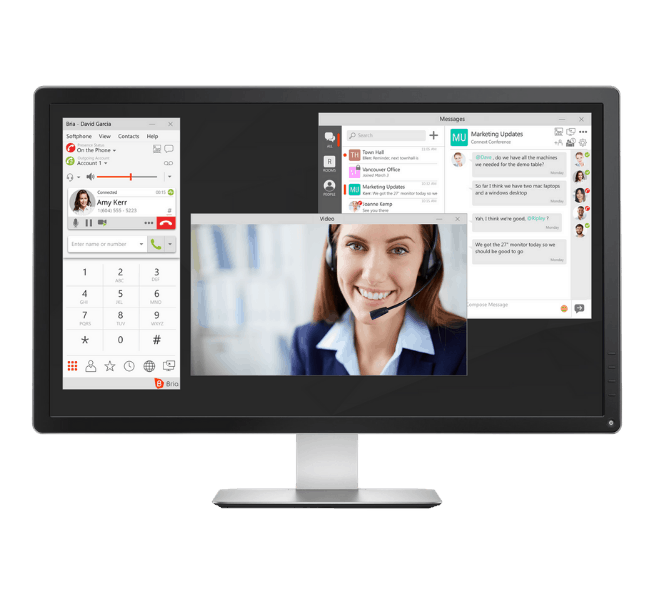
For Windows, you usually get the installer from your company’s Bria Enterprise Portal. This portal holds the most current version. Direct download links are sometimes found in partner guides. These guides explain each step. They provide the necessary installer files.
Bria Enterprise for Mac Setup
Setting up Bria Enterprise on a Mac follows a similar path. Access your organization’s Bria Enterprise Portal. Download the macOS installer file from there. Partner documentation, like from Simtex Communications, can offer detailed setup instructions. This ensures a smooth installation process.
Bria Enterprise iOS App Download

Finding the Bria Enterprise iOS app is simple. Go to the Apple App Store on your iPhone or iPad. Search for ‘Bria Enterprise’. Tap ‘Get’ or ‘Download’. The app installs directly onto your device. This is the fastest way for Apple users.
Bria Enterprise Android App Installation
For Android users, the process is just as straightforward. Open the Google Play Store on your device. Search for ‘Bria Enterprise’. Select the app and tap ‘Install’. Your Android phone or tablet will download and install it. This makes communication accessible anywhere.
CounterPath Bria Enterprise Features
CounterPath develops Bria Enterprise. It is a powerful managed softphone. It requires an active account to work. You need valid credentials. These are given by your administrator. This ensures secure and authorized access. The software is not a standalone product.
Bria Enterprise Portal Login Guide
Accessing the Bria Enterprise Portal is key for desktop downloads. You will need specific login details. These are provided by your IT department. Once logged in, navigate to the download section. Look for the installer for your operating system. This portal is your central hub.
Bria Enterprise Setup Steps
After downloading, the setup begins. You will need your account credentials. Enter your username and password when prompted. Bria Enterprise will ask for permissions. Allow access to your microphone and camera. This is needed for calls and video. Follow the on-screen prompts carefully.
Requirements
Bria Enterprise is not a free, standalone app. It requires an active, provisioned account. You must have valid credentials. These are supplied by your organization or service provider. Without these, the softphone will not function. Always use your official work account.
Getting the correct Bria Enterprise download ensures seamless integration. Always use official sources provided by your IT department. This prevents security risks and setup issues.
Updates are common for Bria Enterprise. Recent versions focus on stability. Crash fixes are a priority. This shows ongoing maintenance. Expect regular improvements. This keeps your communication reliable.
While Bria Enterprise needs an account, other Bria plans offer trials. CounterPath provides a 21-day free trial for Bria Solo and Bria Teams. You can find these on their official website. This lets you test other options. It is a good way to compare.
Verdict: Your Reliable Communication Tool
The Bria Enterprise download process is clear. Mobile downloads are in app stores. Desktop versions come from your company portal. Always use the official installer. This guarantees security and proper function. Make sure you have your login details ready. This ensures a quick setup. For more help, check partner guides like this one from Babelforce. Or find the iOS app directly on the Apple App Store. This softphone is essential for modern business calls.
Your 3-Step Bria Enterprise Download Action Plan
Step 1: Identify Your Platform
Determine if you need the mobile app or desktop client. Mobile apps are on the Apple App Store and Google Play Store.
Desktop versions require access to your organization’s Bria Enterprise Portal for the installer.
Step 2: Obtain Credentials
Contact your IT administrator or service provider to get your username and password. Without an active enterprise account, the app won’t function.
If you don’t have an organization account, consider the free trial for Bria Solo or Bria Teams instead.
Step 3: Install and Grant Permissions
Download the correct installer or app, then follow the on-screen prompts. Upon first launch, you must allow microphone and camera access.
Enter your provided credentials to complete setup. The software will then connect to your enterprise phone system.
Frequently Asked Questions
Can I download Bria Enterprise without an account?
No, Bria Enterprise requires an active enterprise account provisioned by your organization or service provider. Without valid credentials, the app cannot be activated.
Where do I find the desktop installer for Windows or macOS?
Your organization should provide a link to their Bria Enterprise Portal, where the latest installer is hosted. Alternatively, check support documentation from partners like Simtex Communications or ONSIM.
Is there a free trial for Bria Enterprise?
Bria Enterprise itself does not offer a free trial because it is a managed solution. However, CounterPath offers a 21-day free trial for Bria Solo and Bria Teams on their website.
Bria Enterprise is a robust, managed softphone solution that delivers professional call quality and seamless integration with your organization’s phone system. Choosing it means investing in reliable, enterprise-grade communication.
Now that you understand the download process, contact your IT team to get your credentials and start using Bria Enterprise today. Explore the app’s settings to customize your audio and video preferences for optimal performance.
Imagine making and receiving calls with crystal-clear audio, all from your laptop or phone, wherever you are. That’s the power of a properly deployed enterprise softphone.
