


Worried about hidden costs when trying Snowflake? You are not alone. Many people think signing up means giving a credit card, but that is a myth. Snowflake offers a free trial with $400 in credits and no payment info required.
This trial gives you full access to explore data tools for 30 days. You can test features like data sharing and AI integrations without spending a dime. Just use a valid email to start.
Get Your Free Snowflake Trial Account: No Credit Card Needed
In 2026, Snowflake’s trial account is still the best way to test the platform risk-free. You get $400 in credits to use on compute and storage for 30 days. Choose your edition (Standard, Enterprise, or Business Critical) and pick your cloud provider from AWS, Azure, or Google Cloud.
Activation is simple: click the email link within 72 hours to set your password. If you run out of credits or time, your account just pauses. No surprise charges. For students, there is an academic trial with extra resources. Developers can also apply for an extended 120-day trial through partner programs.
Unlock the Power of Data: Your Snowflake Trial Account in 2026
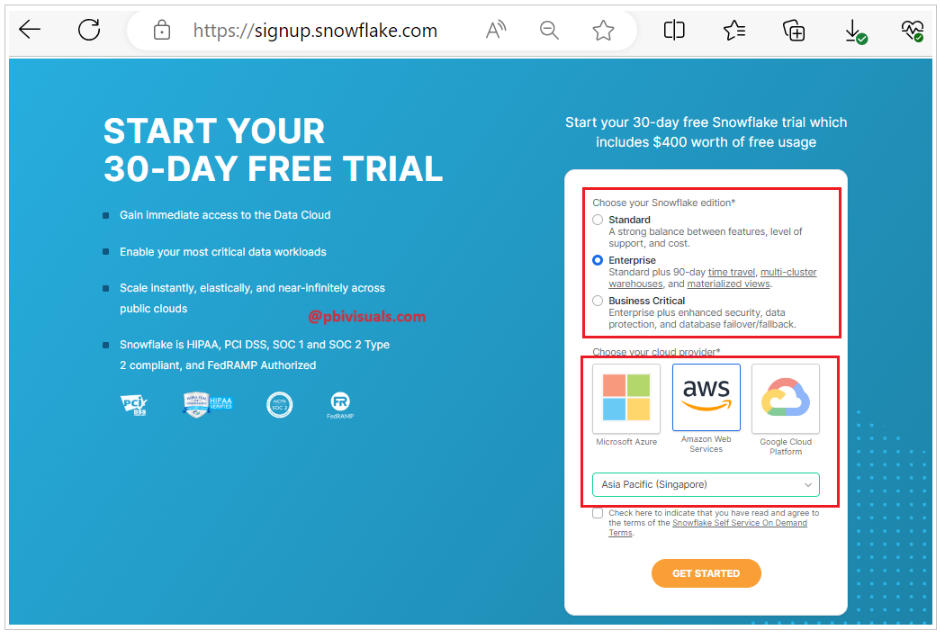
Snowflake offers a powerful free trial, letting you explore its data cloud without commitment. This is your chance to test advanced features and see how Snowflake can transform your data operations. It’s designed for ease of use, so you can focus on learning and building.
The standard trial gives you 30 days and $400 in credits for compute and storage. Signing up is simple, needing only your email. You can choose your Snowflake edition, cloud provider, and region. This hands-on experience is invaluable for understanding Snowflake’s capabilities before you decide to invest.
| Feature | Details |
|---|---|
| Duration | 30 days standard, 120 days extended |
| Credits | $400 free credits |
| Signup | Email only, no credit card required |
| Editions | Standard, Enterprise, Business Critical |
| Cloud Providers | AWS, Azure, GCP |
| Activation | Email link within 72 hours |
| Post-Trial | Account suspended, requires conversion to paid |
Snowflake Free Trial Signup Process
Getting started with a Snowflake trial account is straightforward. You visit the Snowflake website and look for the trial signup option. The process requires minimal information, primarily your email address. This low barrier to entry makes it accessible for anyone wanting to evaluate the platform. You will not be asked for credit card details upfront, reducing any perceived risk.
After submitting your email, you’ll receive a confirmation link. Clicking this link is a crucial step to activate your account and set up your credentials. This ensures you are a real user and helps secure your new Snowflake environment. Make sure to complete this within the specified timeframe to avoid delays.
Snowflake Trial Account Cost and Credits

The $400 in free credits provided with your Snowflake trial account is generous. These credits cover both compute usage (how much processing power you use) and storage (how much data you store). This allows you to experiment with various features without immediate financial worry. It’s important to monitor your credit consumption to understand how different operations impact your balance.
While the trial is free, understanding potential costs after the credits are used is vital. If you decide to continue using Snowflake beyond the trial period or credits, you will need to add payment information. Being aware of this helps prevent unexpected charges and allows for better budget planning. Effective management of your Snowflake test account is key.
For users concerned about hidden costs, resources are available to guide you. Always check documentation for details on credit usage.
Snowflake Trial Duration and Extensions
The standard Snowflake trial lasts for 30 days. This period is generally sufficient for most users to get a solid understanding of the platform. However, Snowflake also offers extended trial options for specific circumstances. These extended trials provide more time to explore the data cloud’s full potential.
One notable extended option is a 120-day trial, often available through educational partnerships or learning platforms. This longer duration is ideal for more in-depth projects or for those who need extra time to integrate Snowflake into their workflow. Always check the specific terms associated with any extended trial you may access.
Snowflake Trial Editions and Cloud Providers
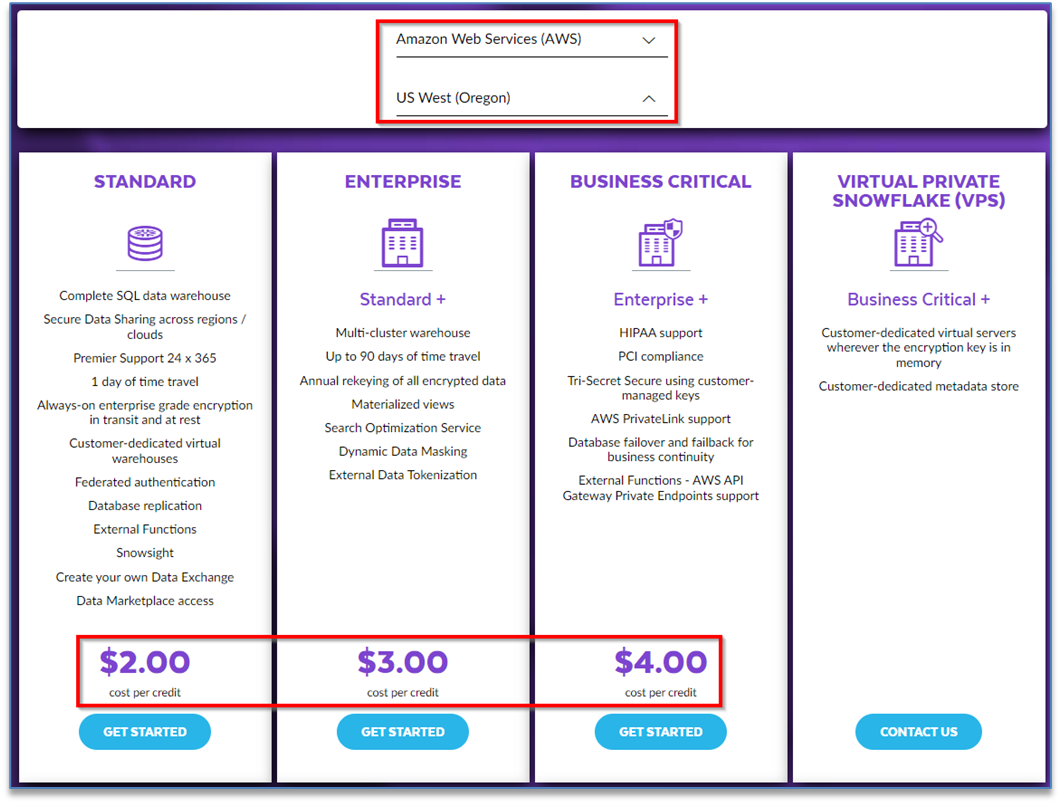
During signup, you can select the Snowflake Edition that best suits your needs. Options typically include Standard, Enterprise, and Business Critical editions, each offering different levels of features and security. This choice allows you to test the specific version you might eventually use for your business.
You also get to choose your preferred cloud provider: Amazon Web Services (AWS), Microsoft Azure, or Google Cloud Platform (GCP). Snowflake’s multi-cloud architecture means you can deploy it on the cloud you are most familiar with or that integrates best with your existing infrastructure. This flexibility is a significant advantage.
Snowflake Trial Account Activation and Regions
Activating your Snowflake trial account is a critical step that must be completed promptly. After signing up, you will receive an email with a link to finalize your account credentials. You typically have 72 hours to click this link. Failure to do so may require you to restart the signup process.
When setting up your account, you will also select a geographical region for your Snowflake instance. Choosing a region close to your data sources or your users can improve performance. Consider factors like data residency requirements and latency when making this decision for your Snowflake test account.
Snowflake Academic Trial for Students
Snowflake recognizes the importance of data education and offers specific programs for students and educators. These academic trials often provide extended access or tailored resources to support learning. It’s a fantastic opportunity for students to gain practical experience with a leading data cloud platform.
These programs are designed to help aspiring data professionals build their skills. By using Snowflake in an academic setting, students can prepare for future roles in data science, engineering, and analytics. Look for specific academic program details on the Snowflake website.
Snowflake Trial for Developers: AI Data Cloud
For developers, the Snowflake trial is an excellent gateway to building AI applications. The platform’s ability to handle massive datasets and provide fast query performance is ideal for machine learning and AI workloads. You can experiment with data sharing and collaboration features that are essential for modern development.
Snowflake’s AI Data Cloud capabilities allow you to mobilize your data effectively. The trial lets you test how easily you can ingest, process, and analyze data for AI model training. This hands-on experience is invaluable for anyone looking to leverage data for intelligent applications.
Snowflake Trial Account Expiration and Suspension
Once your trial period ends or your $400 credits are depleted, your Snowflake account will enter a suspended state. This means you will no longer be able to run queries or perform operations. The account is not deleted, but it becomes inactive until you decide to convert it to a paid subscription.
To resume using your account, you will need to add payment details and upgrade to a paid plan. This ensures a seamless transition if you choose to continue with Snowflake. It also prevents accidental charges after the free trial concludes.
Be mindful that creating multiple trial accounts might require different email addresses or adherence to waiting periods. Always review Snowflake’s terms of service.
The Verdict: Snowflake Trial in 2026
In 2026, the Snowflake trial account remains an indispensable tool for evaluating its data cloud. The generous credits and flexible options make it easy for businesses and individuals to test its capabilities. It’s a risk-free way to experience firsthand how Snowflake can enhance data management and analytics.
The platform’s continued evolution ensures that the trial experience is always relevant. Whether you are a developer, data analyst, or business leader, the trial provides the necessary environment to make informed decisions about your data strategy. Embrace the opportunity to explore Snowflake’s potential.
Your 3-Step Action Plan for Snowflake Trial Success
Step 1: Sign Up Strategically
Use a valid email and select the Enterprise Edition for full feature access. Choose your cloud provider and region wisely based on your existing infrastructure.
Step 2: Activate and Setup
Click the activation link within 72 hours to avoid expiration. Immediately configure your warehouse, roles, and sample data to start testing.
Step 3: Monitor Credits and Plan Ahead
Track your $400 credit usage in the account console. Set up alerts and convert to a paid plan before credits run out to avoid service interruption.
Frequently Asked Questions
Can I extend my trial beyond 30 days?
Yes, you may qualify for a 120-day trial through educational partnerships or specific learning platforms. This extended trial still includes the $400 credit allowance.
What happens when my trial credits run out?
Your account enters a suspended state, preventing any queries. You must add payment details and convert to a paid subscription to resume usage.
Can I create multiple trial accounts?
Yes, but you will likely need a different email address and may have to wait a certain period. Snowflake’s terms allow multiple trials, but abuse may lead to restrictions.
Choosing Snowflake’s trial is a smart way to test its powerful data cloud without risk. You gain hands-on experience with a platform trusted by industry leaders.
Now that you understand the setup, take the next step and explore building a simple data pipeline. Use the free credits to experiment with AI and analytics features.
Imagine your data flowing seamlessly across clouds, unlocking insights in real time. The future of data management is here, and you are already part of it.
