


Are you tired of your Zoom meetings cutting off at 40 minutes? That free plan is great for quick chats, but it becomes a hassle when you need to run a real business call or a longer class. If you’re paying for a subscription, you want to know exactly what you’re getting for your money.
The good news is Zoom has clear pricing tiers, from the free Basic plan up to Business Plus. But with so many options and add-ons like Zoom Phone and AI Companion, it’s easy to overpay. Let’s cut through the confusion and find the plan that actually fits your needs and your budget.
Zoom Subscription Plans: Free vs Pro vs Business in 2026
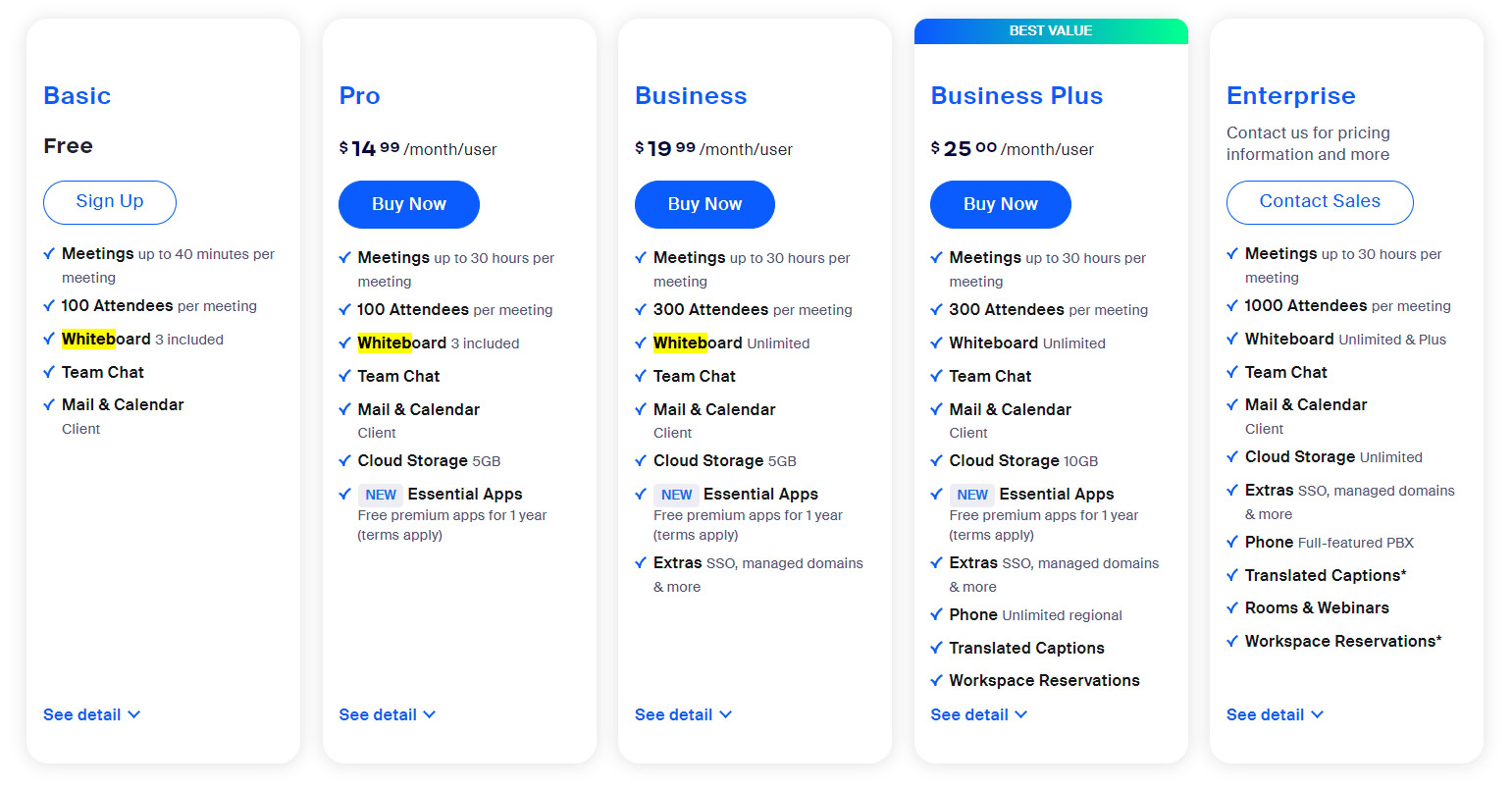
Zoom’s free Basic plan gives you unlimited 1-on-1 meetings, but group calls are capped at 40 minutes and 100 participants. For most working women, that’s a dealbreaker for team meetings or client calls. Paid plans remove that limit and add features like cloud recording and the AI Companion.
The Zoom Pro plan costs about $15.99 per month, or $13.33 if you pay yearly. It gives you 30-hour meetings, 10GB of cloud storage, and unlimited AI note-taking. For a small business or freelancer, this is usually the sweet spot between cost and capability. If you need more participants or admin controls, the Business plan at $21.99 per user per month supports up to 300 attendees.
Zoom Subscriptions: Your Guide to Staying Connected in 2026
Zoom continues to be a leader in virtual meetings in 2026, offering flexible subscription plans for everyone. Whether you’re a student, a small business owner, or part of a large corporation, there’s a Zoom plan designed to fit your needs. Understanding these options helps you choose the best value and features for your specific situation.
The core of Zoom’s offering remains its accessibility, with a robust free plan for basic needs. However, for enhanced productivity and longer meetings, paid subscriptions unlock powerful tools. Let’s break down the Zoom pricing tiers and what they offer to help you make an informed decision.
| Plan | Price (Approx. Monthly, Annual Billing) | Meeting Limit | Participants | Key Features |
|---|---|---|---|---|
| Basic | Free | 40 minutes (3+ participants) | 100 | Team Chat, 100 Participants |
| Pro | $13.33 | 30 hours | 100 | 10GB Cloud Storage, AI Companion |
| Business | $21.99/user | 30 hours | 300 | Admin Tools, SSO, 3 Managed Domains |
| Business Plus | $29/user | 30 hours | 300 | Zoom Phone, More Cloud Storage |
Zoom Pricing Tiers for Business
For businesses, Zoom offers tiered solutions that scale with your company’s growth. The Zoom Business plan is ideal for growing teams, supporting up to 300 participants and including essential administrative features like Single Sign-On (SSO). This ensures secure and streamlined access for your employees.
The premium Zoom Business Plus tier often bundles advanced services like Zoom Phone, providing a unified communication solution. These plans are built to enhance collaboration and manageability for organizations of all sizes, ensuring you have the tools you need to succeed.
Zoom Free vs Paid Plans
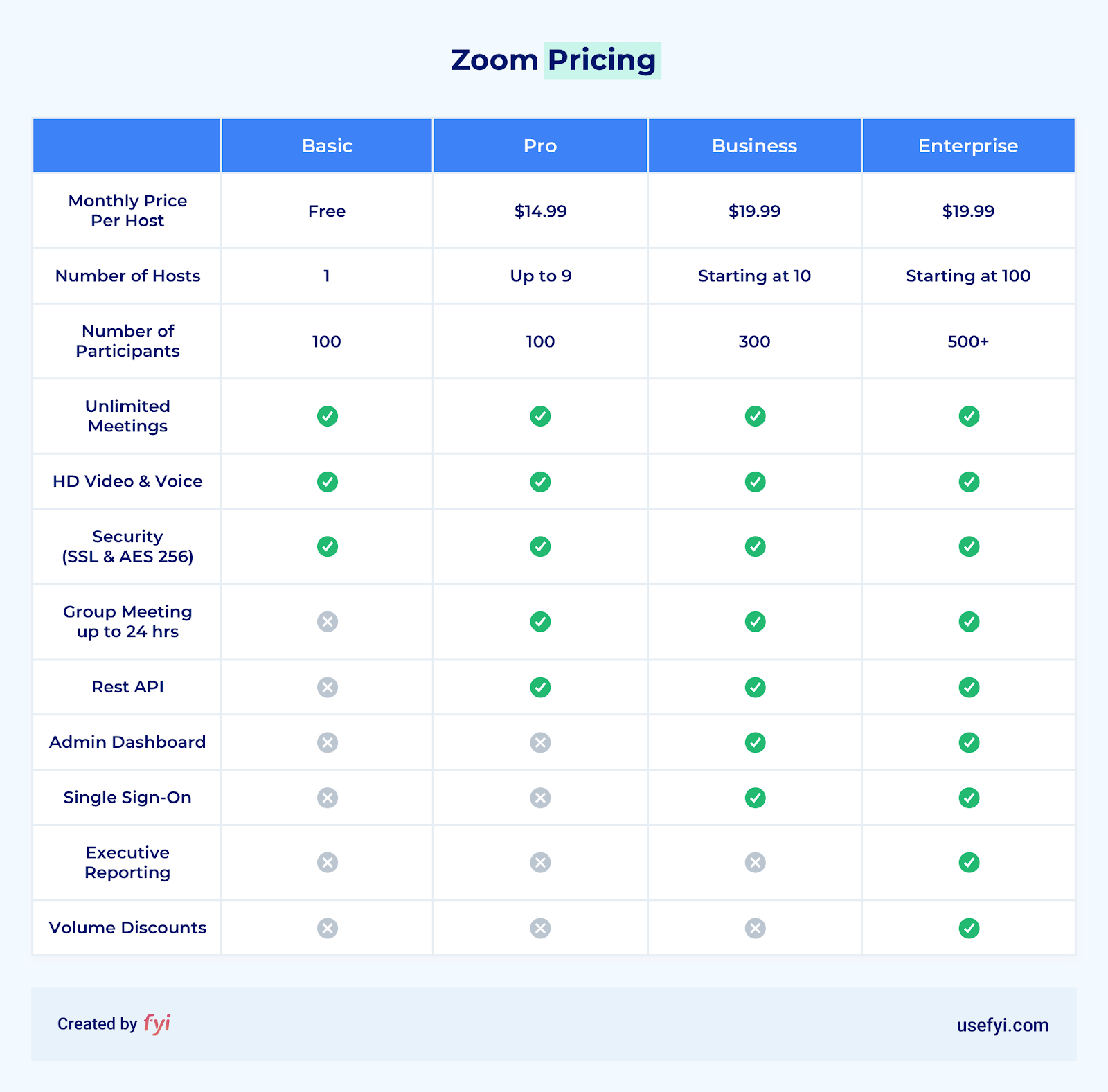
The Zoom Basic plan is a great starting point, offering core video conferencing for up to 100 participants. However, its 40-minute limit for meetings with three or more people can be restrictive for professional use. This is where paid plans shine.
Paid subscriptions remove the 40-minute constraint, offering 30-hour meeting durations. They also provide crucial features like increased cloud storage for recordings and access to the AI Companion, making the upgrade a significant productivity boost for many users.
Zoom Meeting Plan Features
Each Zoom plan comes with a distinct set of features tailored to different user needs. The Pro plan, for instance, includes 10GB of cloud storage, which is invaluable for saving and accessing meeting recordings. It also grants full access to the AI Companion.
Higher tiers, like Business and Business Plus, add administrative controls and integrations. These are vital for managing user accounts, ensuring security, and embedding Zoom seamlessly into your existing workflows. Explore the Zoom features by plan to find the perfect fit.
For businesses needing robust meeting management and security, the paid Zoom plans offer significant advantages over the free tier. Features like SSO and managed domains are critical for enterprise environments.
Zoom Webinar Pricing Options
For organizations looking to host larger online events, Zoom Webinars provide a dedicated solution. Starting at approximately $79/month, these plans allow you to host up to 500 attendees. Advanced features like Q&A management and reporting are included.
These webinar plans are separate from standard meeting subscriptions but can be integrated. They are essential for companies conducting online training, large-scale presentations, or public information sessions, offering a professional and engaging experience for your audience.
Zoom Phone Plans for Teams
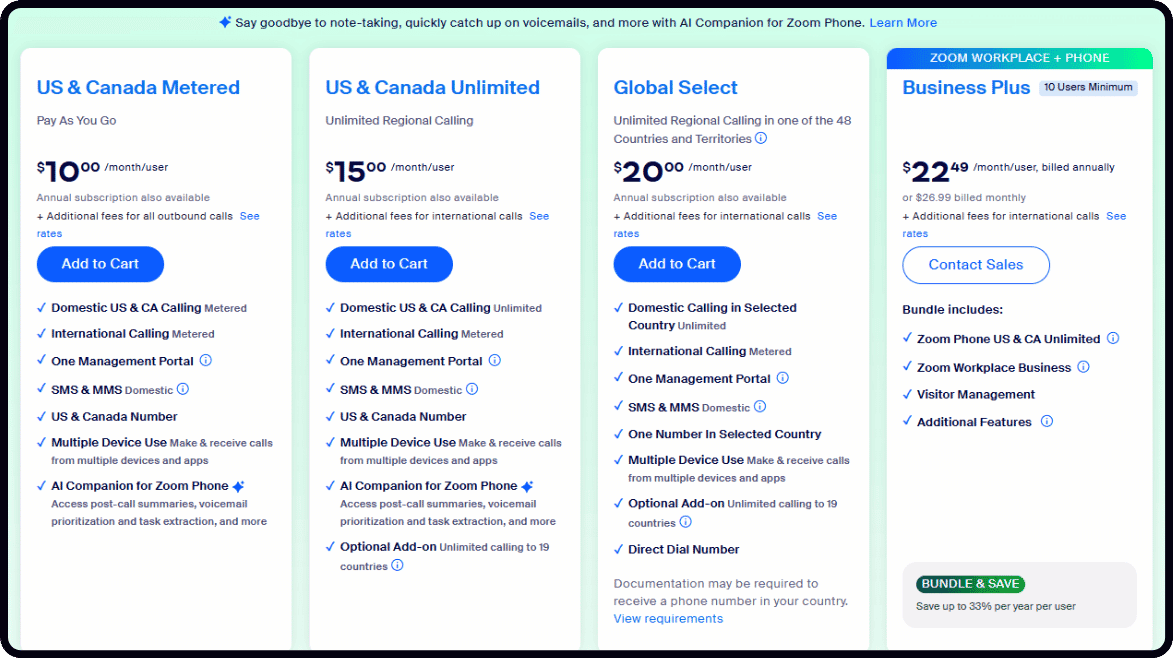
In 2026, unified communications are key, and Zoom Phone plans offer a compelling option. With unlimited calling in the US and Canada starting at $15/month, it integrates seamlessly with Zoom Meetings. This provides a single platform for all your communication needs.
These plans are designed for teams and businesses looking to consolidate their phone systems. They offer advanced call management features, voicemail, and the flexibility to use Zoom Phone on various devices, enhancing team connectivity.
Zoom Cloud Storage Add-Ons
While paid plans include a base amount of cloud storage, additional capacity can be purchased as needed. For example, an extra 30GB of cloud storage costs about $10/month. This is crucial for users who record many meetings or need to store large files.
Adequate cloud storage ensures you don’t lose important recordings and can easily access them later. It’s a simple but vital add-on for maintaining an organized and efficient workflow within the Zoom ecosystem.
Zoom AI Companion Benefits
The Zoom AI Companion is a standout feature in 2026, offering intelligent assistance across paid plans. It can automatically take meeting notes, generate summaries, and even help draft responses. This significantly boosts productivity and ensures key information is captured.
Leveraging AI reduces the burden on participants to manually take notes, allowing them to focus more on the discussion. The AI Companion transforms meetings from passive events into active, productive sessions, saving valuable time.
Manage Your Zoom Subscription
Managing your Zoom subscription is straightforward through the Zoom Web Portal. Navigate to ‘Plans and Billing’ and then ‘Plan Management’ to view details, upgrade your plan, or make changes. Understanding these options empowers you to control your subscription effectively.
Zoom subscriptions are set to auto-renew by default. It is important to be aware of your billing cycle and cancel before renewal if you no longer need the service. This proactive management prevents unexpected charges and ensures you only pay for what you use.
If you encounter any issues or have questions, the Zoom support portal offers extensive resources. You can find articles, guides, and contact options to resolve any subscription-related queries. Staying informed about your plan details is key to maximizing value.
The Expert Verdict: Zoom’s Continued Dominance
In 2026, Zoom’s subscription model remains a powerful engine for its market leadership. The company’s strategy of offering a functional free tier while providing compelling, tiered upgrades for professional use is highly effective. The integration of AI features like the AI Companion is a significant differentiator, adding tangible value for paid subscribers.
While competitors offer alternatives, Zoom’s focus on user experience, reliability, and continuous feature enhancement, particularly in business and communication tools, solidifies its position. For individuals and businesses seeking robust, scalable video conferencing and communication solutions, Zoom subscriptions continue to be a smart investment in 2026.
Your Zoom Subscription Action Plan
Step 1: Match Your Needs
Start by counting your typical meeting participants and required duration. If you host small teams under 100, the free Basic plan may suffice for short calls.
For unlimited 30-hour meetings and AI note-taking, upgrade to Pro. Business users with 10+ staff should consider Business for admin controls.
Step 2: Optimize Your Budget
Choose annual billing to save roughly 20% on monthly rates. Add only essential extras like cloud storage or webinar licenses.
Common mistake: overpaying for unused features. Review your usage history before committing to a tier.
Step 3: Manage Your Plan
Access your account at zoom.us, go to ‘Plans and Billing’, then ‘Plan Management’ to view or change your subscription. Cancel before the renewal date to avoid charges.
Enable auto-renewal alerts in your calendar. Zoom subscriptions renew automatically unless you manually cancel.
Frequently Asked Questions
Can I switch plans mid-cycle?
Yes, upgrades take effect immediately and you pay a prorated difference. Downgrades apply at the next billing cycle.
Always check your current plan details on the Zoom web portal before making changes.
What happens if my meeting exceeds the 40-minute limit on Basic?
The meeting automatically ends at 40 minutes for groups of three or more. You can restart a new meeting, but the limit resets.
To avoid interruptions, upgrade to Pro which removes this restriction entirely.
Does the AI Companion work on all paid plans?
Yes, the AI Companion is included with Pro, Business, and Enterprise plans. It provides meeting summaries, action items, and smart recordings.
You can enable it per meeting from the host controls. Note that AI features require host permission.
Choosing the right Zoom subscription is a strategic decision that directly impacts your team’s productivity and communication flow. With clear tiers and transparent pricing, you can confidently select a plan that scales with your needs.
Take action today by logging into your Zoom account and reviewing your current plan against the features described here. Your next step is to align your subscription with your actual usage patterns.
Imagine a workspace where every meeting is captured, summarized, and searchable, freeing you to focus on what matters. That future is just a plan upgrade away.
