


Think you need thousands of followers to start selling on TikTok? That is a myth. TikTok Shop lets you sell directly to buyers even with zero followers, no creator account needed.
Setting up a seller account is straightforward if you know the steps. From choosing between individual and business registration to linking your bank and tax forms, this guide walks you through the exact process.
How to Create a TikTok Seller Account: Individual vs Business Requirements
To sell on TikTok, you must register through the TikTok Shop Seller Center at seller.tiktok.com. You can either authorize an existing creator account or create a new standalone seller account using a fresh email or phone number. During setup, choose your business type: Individual or Business.
Individual sellers must be at least 18 and live in an eligible country like the US or UK. You will need a valid government ID, such as a passport or driver’s license. Business entities like LLCs or corporations must provide an Employer Identification Number (EIN) in the US, plus a business license and ID for the legal representative.
After registration, complete the onboarding checklist: verify your identity (review takes 1–3 business days), set up a warehouse address for pickups and a return address, link a bank account matching your registered name, and submit tax info. In the US, that means filling out a W-9 form. There are zero setup fees, no follower minimum, and new sellers can earn up to $1,900 in rewards plus $10,000 in ad credits.
| Product | Average Price ($) | Highlight |
| Business License/Permit | 100 – 500 | Required for business accounts. |
| EIN (Employer Identification Number) | Free (Online Application) | Essential for US business sellers. |
| Valid Government ID | N/A (Already Owned) | Needed for individual seller verification. |
| Smartphone with Camera | 200 – 800 | For document uploads and verification. |
| Reliable Internet Connection | 50 – 100/month | For consistent access to TikTok Shop Seller Center. |
| Basic Computer/Laptop | 300 – 1000 | For managing inventory and listings. |
| Accounting Software (Basic) | 15 – 50/month | To track sales and manage tax forms. |
| Scanner (Optional, can use smartphone) | 50 – 200 | For clearer document scanning. |
| E-commerce Platform Integration (Optional) | 50 – 300/month | Streamlines listing and inventory management. |
| Legal Consultation (Optional) | 150 – 400/hour | For complex business setup or tax advice. |
WHAT REALLY WORKS
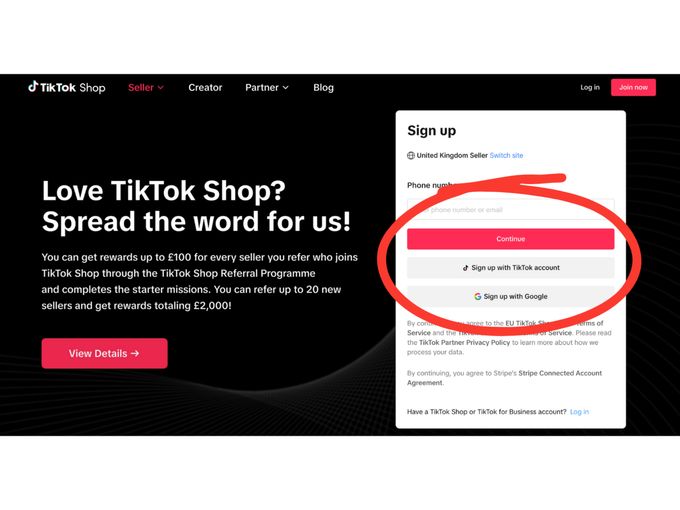
Setting up a TikTok Shop Seller account requires specific documentation. This ensures legitimacy and compliance with platform rules. You’ll need to provide proof of identity and business status. This process is crucial for accessing TikTok Shop payouts and managing your sales effectively.
The TikTok Shop Verification Process can take a few business days. Having all your documents ready speeds this up. This includes your EIN for TikTok Shop if you are a business. For individuals, a valid government-issued ID is key.
TikTok Shop Seller Center: Your Dashboard Overview
The TikTok Shop Seller Center is your command center. It’s where you manage products, orders, and analytics. Choose a setup that aligns with your business type, whether individual or business seller. Ensure your chosen path allows for easy migration if you’re moving from a creator account.
1. Valid Government ID
This is a fundamental requirement for individual sellers. It proves you are who you say you are. Without it, your account cannot be verified. This is a non-negotiable step for selling on TikTok.
Average Price: N/A (Already Owned).
Practical Tip: Ensure your ID is clear, not expired, and matches your registered name exactly.
2. EIN (Employer Identification Number)
For businesses in the US, an EIN is vital. It’s like a social security number for your business. You need it for tax purposes and to open a business bank account. The application is free and done online.
Average Price: Free.
Practical Tip: Apply directly on the IRS website to avoid unnecessary fees.
3. Smartphone with Camera
You will use your smartphone for verification. This includes taking clear pictures of your ID or business documents. A good camera makes the TikTok Shop verification process smoother. It’s also how you’ll likely manage some aspects of your shop on the go.
Average Price: $200 – $800.
Practical Tip: Use good lighting and a steady hand for the clearest photos.
4. Business License/Permit
If you operate as a business entity, a license is often required. This shows your business is legally registered. Requirements vary by state and city. Check your local government website for specifics.
Average Price: $100 – $500.
Practical Tip: Research local regulations early to avoid delays.
5. Reliable Internet Connection
Consistent internet is non-negotiable. You need to access the TikTok Shop Seller Center regularly. This ensures you don’t miss orders or important updates. Slow internet can hinder your sales performance.
Average Price: $50 – $100/month.
Practical Tip: Test your internet speed to ensure it meets the platform’s recommendations.
6. Basic Computer/Laptop
While you can manage some tasks on mobile, a computer is more efficient. You’ll use it for detailed product listings and inventory management. It also helps when filling out W-9 forms for TikTok Shop.
Average Price: $300 – $1000.
Practical Tip: A reliable machine prevents frustration and saves time.
7. Scanner (Optional, can use smartphone)
A scanner can provide sharper document images than a phone camera. This is helpful for clearer uploads during verification. Many modern smartphones have excellent scanning apps, making this optional.
Average Price: $50 – $200.
Practical Tip: Use a scanning app on your phone if you want to save money.
8. Accounting Software (Basic)
Tracking your income and expenses is crucial. Basic accounting software helps manage this. It simplifies preparing for TikTok Shop tax forms. Good financial records are essential for business health.
Average Price: $15 – $50/month.
Practical Tip: Start with simple software; you can upgrade later if needed.
9. E-commerce Platform Integration (Optional)
Some platforms connect directly to TikTok Shop. This can automate inventory and listing updates. It’s useful if you sell on multiple channels. It helps manage your presence across different marketplaces.
Average Price: $50 – $300/month.
Practical Tip: Ensure the integration is compatible with your existing systems.
10. Legal Consultation (Optional)
For complex business structures or tax questions, consult a lawyer. They can guide you on compliance. This is especially helpful if you’re unsure about business seller requirements TikTok.
Average Price: $150 – $400/hour.
Practical Tip: Prepare specific questions beforehand to maximize consultation time.
WHICH ONE TO BUY TODAY?
For the best value, focus on the essentials first. A valid government ID and a reliable smartphone are your starting points. If you’re a business, securing your EIN is a free and critical step. These foundational items are low-cost or free, allowing you to begin the TikTok Shop Seller account setup without significant investment.
The best long-term investment is a stable internet connection and a functional computer. These tools support consistent operations and growth. They ensure you can effectively manage your sales and engage with customers through the TikTok Shop Seller Center. Prioritize these for a smooth selling experience.
First Steps After Approval
Once your seller account is active, start by uploading your first product with clear images and a compelling description. TikTok Shop rewards listings that look professional and authentic.
What to Avoid
- Do not use copyrighted images or music in your listings. TikTok’s system flags these automatically.
- Avoid setting unrealistic shipping times. Customers expect fast delivery, and delays hurt your rating.
Your Setup Checklist
- Link your bank account and verify the payout details. Even a small typo can delay payments.
- Set up your warehouse address and return address. You must have a physical location for pickups.
- Complete your tax information (W-9 in the US). Without it, your payouts are frozen.
- Test your storefront by placing a sample order. See exactly what your customer sees.
Double-check that your shipping settings match your real capacity. Under-promising and over-delivering builds trust.
Enable notifications for new orders and messages. Fast replies improve your response rate and ranking.
Frequently Asked Questions
Can I sell without a business license?
Yes, if you register as an individual seller. You only need a valid government ID like a driver’s license.
For business accounts, you must provide official documents such as an EIN or business license.
How long does identity verification take?
Most verifications are processed within 1 to 3 business days. Incomplete or blurry submissions cause delays.
You can check your status in the Seller Center dashboard under Account Verification.
Is there a minimum follower requirement?
No, TikTok Shop has no minimum follower count to start selling. You can begin with zero followers.
However, building an audience helps drive sales through organic content and live streams.
You now have the essential steps to launch your TikTok Shop with confidence. This platform removes traditional barriers like setup fees and follower minimums.
Start by listing one product and testing the buying process. Then explore TikTok’s advertising credits to boost your first sales.
Social commerce is evolving fast, and your storefront is your gateway to millions of engaged shoppers. Take the first step today.
