


You keep paying for server power you rarely use. Most hosting plans lock you into fixed resources that waste money during quiet hours. Renting a server in 2026 means paying only for what you actually need, with the ability to scale up instantly when traffic spikes.
Think of it like leasing a car instead of buying one. You get a high-performance machine without the upfront cost or maintenance headaches. Whether you run a game server, a small business site, or a data-heavy app, the right rental plan saves you cash and gives you professional-grade hardware.
Rent a Dedicated Server or VPS: Which Fits Your Needs?
Choosing between a rent dedicated server and a rent VPS server depends on your workload. A VPS (Virtual Private Server) gives you dedicated CPU and RAM within a shared physical machine, starting as low as $5 per month from providers like DigitalOcean or IONOS. This is perfect for small to medium websites or custom applications that need predictable performance without the cost of a full machine.
For heavy lifting, a bare metal server rental puts an entire physical server at your command. Prices begin around $45 per month from hosts like Hetzner or OVHcloud, featuring Intel Xeon or AMD Ryzen processors, DDR5 RAM, and NVMe SSD storage. This setup is essential for high-traffic e-commerce, big data processing, or running multiple game servers simultaneously. The key difference is control: VPS is flexible and cheap, while dedicated gives raw power and zero resource sharing.
| Product | Average Price ($) | Highlight |
|---|---|---|
| Hetzner Cloud Instance | 4.50 | Cost-effective cloud computing server for basic needs. |
| Namecheap VPS | 7.00 | Affordable server hosting with good value. |
| DigitalOcean Droplet | 10.00 | Scalable virtual private server hosting for developers. |
| IONOS VPS | 15.00 | Managed server hosting with included support. |
| OVHcloud VPS | 20.00 | Reliable VPS with strong network performance. |
| Namecheap Dedicated Server | 45.00 | Entry-level dedicated hosting for more control. |
| Hetzner Dedicated Server | 50.00 | High-performance bare metal server rental at great prices. |
| OVHcloud Dedicated Server | 70.00 | Professional server hosting with robust hardware. |
| Leaseweb Dedicated Server | 100.00 | Enterprise-grade dedicated hosting with global reach. |
| High-Performance Ryzen Server | 150.00+ | Top-tier bare metal server rental for demanding workloads. |
WHAT REALLY WORKS:
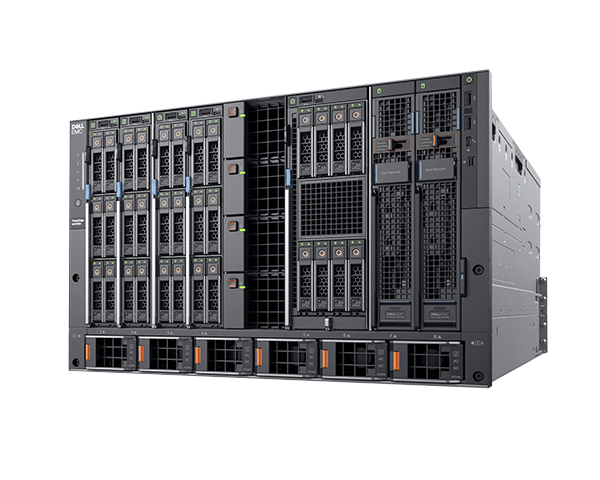
Renting a hosting server in 2026 means choosing between VPS, cloud, and dedicated options. VPS offers a good balance of price and dedicated resources, ideal for many websites. Cloud servers provide ultimate flexibility, letting you scale up or down instantly. Dedicated servers give you a whole machine for maximum power and control.
For demanding tasks like big data or high-traffic sites, consider dedicated hosting. Look for strong CPUs like Intel Xeon or AMD Ryzen and fast NVMe SSD storage. Game server rental is a specialized need, often with providers offering quick setup for popular titles.
Dedicated Server Rental for High Performance:
When looking for a dedicated server, focus on CPU cores, RAM, and storage speed. NVMe SSDs are much faster than traditional SSDs. Check the network connection speed, aiming for 10Gbps if possible. Ensure the provider offers the operating system you need, like Linux server rental or Windows server rental.
Read also: VPS Server Bitcoin Payment: No ID Needed for Anonymity
1. Hetzner Cloud Instance
These cloud instances offer a very low entry price for cloud computing server needs. They are great for testing or small applications. You get scalable resources on demand.
Average Price: $4.50
Practical Tip: Perfect for developers needing a test environment or small personal projects that don’t need constant high power.
2. Namecheap VPS
Namecheap provides affordable server hosting with a solid balance of features for a virtual private server. It’s a good starting point for many small to medium websites.
Read also: How to buy a web domain in 2026 without overpaying
Average Price: $7.00
Practical Tip: Use this for your first website or blog when you need more than shared hosting but aren’t ready for a dedicated machine.
3. DigitalOcean Droplet
DigitalOcean’s Droplets are virtual private server hosting solutions popular with developers. They offer easy scalability and a clean interface for managing your server.
Average Price: $10.00
Practical Tip: Excellent for web applications, development projects, and APIs that might experience traffic spikes.
4. IONOS VPS
IONOS offers managed server hosting, meaning they handle some of the technical upkeep. This is helpful if you want a virtual private server but less server administration.
Average Price: $15.00
Practical Tip: A good choice if you’re not a tech expert and want a reliable virtual private server with support.
5. OVHcloud VPS
OVHcloud provides reliable VPS options with strong network infrastructure. They offer good performance for their price point, suitable for various online projects.
Average Price: $20.00
Practical Tip: Ideal for hosting websites or applications that require consistent uptime and good network speeds.
6. Namecheap Dedicated Server
This is an entry-level option for dedicated hosting, giving you a full physical server. It offers more power and control than a VPS for a higher price.
Average Price: $45.00
Practical Tip: Consider this if your website is growing rapidly and needs more resources than a VPS can provide.
7. Hetzner Dedicated Server
Hetzner is known for offering high-performance bare metal server rental at very competitive prices. You get a lot of power for your money with these options.
Average Price: $50.00
Practical Tip: Excellent value for demanding applications, game servers, or websites needing significant processing power.
8. OVHcloud Dedicated Server
OVHcloud offers professional server hosting with robust hardware configurations. These bare metal servers are built for reliability and performance for business needs.
Average Price: $70.00
Practical Tip: Suitable for businesses needing a powerful and stable platform for critical applications or high-traffic websites.
9. Leaseweb Dedicated Server
Leaseweb provides enterprise-grade dedicated hosting solutions with a global presence. They focus on high availability and support for demanding workloads.
Average Price: $100.00
Practical Tip: Best for larger businesses or those with international audiences requiring top-tier performance and reliability.
10. High-Performance Ryzen Server
These are top-tier bare metal server rental options, often featuring the latest AMD Ryzen processors. They deliver extreme speed for the most demanding tasks.
Average Price: $150.00+
Practical Tip: Use this for intensive tasks like video rendering, large databases, or high-frequency trading platforms.
WHICH ONE TO BUY TODAY? (VERDICT):
For the best value, the Hetzner Cloud Instance or Hetzner Dedicated Server often provides the most power for the dollar. These options are fantastic for getting high performance without breaking the bank, especially if you’re comfortable managing your own server.
If you’re looking for the best investment for growth and flexibility, a DigitalOcean Droplet or OVHcloud VPS is a strong choice. They offer scalability and reliable performance, making them ideal for businesses that anticipate needing more resources over time.
Read also: Stop Overpaying for Your Domain Name (Save Money Now)
Post-Purchase Checklist: Get Your Server Running Right
What to Check Immediately
As soon as you get access, log in and check your SSH key setup. Disable root login via password to prevent brute force attacks.
Run a quick security update using your package manager. For Ubuntu, that’s ‘sudo apt update && sudo apt upgrade’ right away.
Common Mistakes to Avoid
Do not leave default ports open. Change your SSH port from 22 to something else like 2222 to reduce bot traffic.
Never skip setting up a firewall. Use ‘ufw’ on Linux to allow only necessary ports like 80 and 443 for web traffic.
First Steps for Beginners
If you chose an unmanaged server, install a control panel like CyberPanel or Vestacp to simplify management. This saves you from command line headaches.
Always configure a swap file if your RAM is under 2GB. It prevents crashes during traffic spikes.
Frequently Asked Questions
Can I upgrade my server later?
Yes, most providers allow scaling resources like RAM and CPU within minutes. Cloud hosting offers the easiest upgrades without downtime.
What is the difference between managed and unmanaged?
Managed hosting includes provider support for maintenance and security updates. Unmanaged gives you full control but requires technical knowledge.
How do I choose between Linux and Windows?
Linux is free and ideal for most web applications, while Windows is necessary for .NET or ASP.NET sites. Your choice depends on your software stack.
Choosing the right server type sets the foundation for your online success. Whether you need a budget VPS or a powerhouse dedicated machine, match your choice to your traffic and technical skill.
Now it’s time to test a provider with a free trial or low-cost plan. Start small, monitor performance, and upgrade as your project grows.
Imagine your site loading instantly from anywhere in the world. That speed and reliability are within reach when you rent the right hosting server today.
