


You have a business but customers can’t find you on Google Maps. That is money walking out the door. Registering with Google Business is the single most important step to get found online.
Many small business owners think it is complicated or expensive. It is not. It is free and takes less than an hour. Let me show you exactly how to do it in 2026.
What Is Google Business Profile and Why You Need It in 2026
Google Business Profile is your free listing on Google Search and Maps. When someone searches for your type of business, your profile shows up with your address, phone number, hours, and reviews. It is the first thing customers see.
Over 80% of people use Google to find local businesses. If you are not listed, you are invisible. The good news is that you do not need a website or a fancy office. Even a service-area business without a storefront can qualify.
You must meet one key rule: you must serve customers in person during your stated hours. A P.O. box or virtual office will not work. Google checks this during verification, so be honest.
Google Business Profile: Your 2026 Digital Signpost
In 2026, Google Business Profile (GBP) is essential for local businesses. It puts you on Google Search and Maps. This guide shows you how to register with Google Business.
| Item | Cost (USD) | Time |
| Google Business Profile Setup | $0 | 1-2 Hours |
| Verification (Postcard) | $0 | 1-2 Weeks |
| Verification (Video/Phone/Email) | $0 | 1-3 Days |
| Professional Photos (Optional) | $100 – $500 | 1 Day |
| Local SEO Management (Monthly) | $300 – $1500 | Ongoing |
Get Started with Google Business Profile Registration
Registering with Google Business Profile is your first step. It helps customers find you online. This process is free and straightforward.
Visit the Google Business Profile website. Sign in with your Google Account. This links your business to your Google identity.
Read also: How to buy an Amazon pallet without losing money in 2026
Enter your business name accurately. Choose the best business category. This helps Google understand what you do.
Provide your exact location and contact details. Accuracy here is crucial for local search. This is the core of your Google Business listing.
Next, we will look at the specific steps to create your listing. This ensures you know exactly how to register with Google Business.
How to Create a Google Business Listing
Creating your Google Business listing is simple. Follow these steps for a strong online presence. This is key for your Google Business Profile setup.
Read also: I Need a Business Email Address – Here’s the Cheapest Way to Get One
Go to the Google Business Profile page. Click ‘Manage now’. You will be prompted to sign in or create a Google Account.
Type in your business name. Then, select your business category. Be specific to attract the right customers.
Add your business address. If you serve customers at your location, this is vital. If you are a service-area business, you have options.
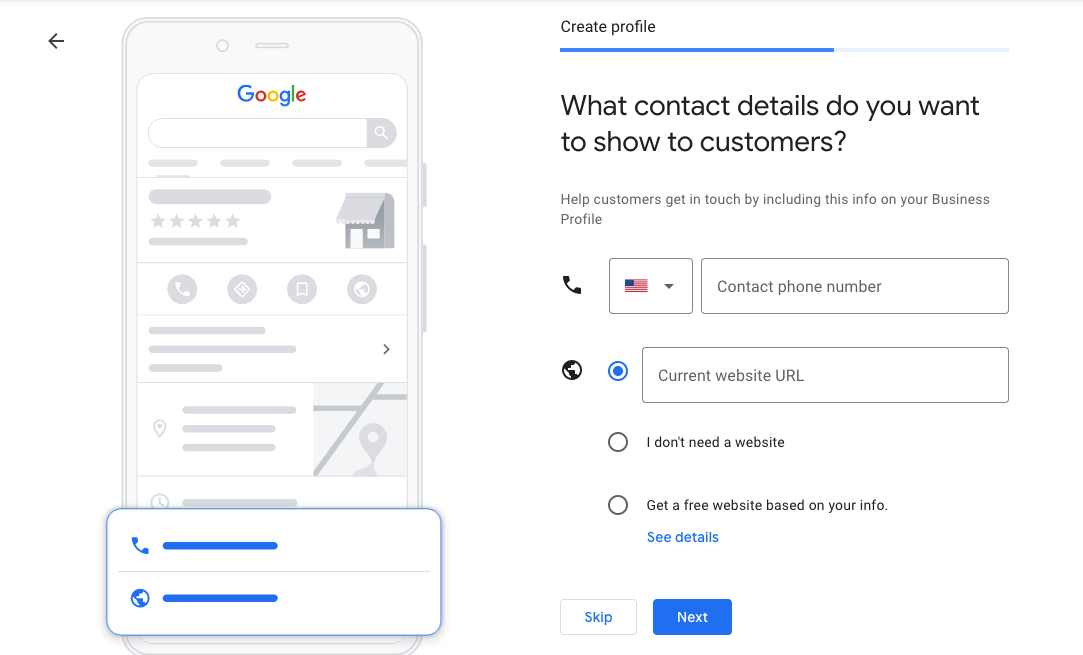
Enter your phone number and website URL. These are direct ways for customers to reach you. This completes the basic setup for your Google Business Profile.
Now, let’s discuss how to confirm your business is real. This is the Google Business verification step.
Google Business Verification Methods
Verification proves your business is legitimate. Google needs to confirm you operate at the listed location. This is a mandatory step for any Google Business Profile.
Common methods include postcard, phone, email, or video. The postcard method is the most traditional. It arrives by mail within two weeks.
Phone or email verification is faster. You receive a code to confirm your business. This is ideal for quick setup.
A video recording can also work. You show your business location and signage. This provides strong evidence to Google.
Choosing the right method speeds up your listing. This ensures your business is discoverable. Let’s look at setting up if you don’t have a physical storefront.
Set Up Google Business Without an Address
You can register with Google Business even without a public storefront. This is perfect for home-based or service-area businesses. This is a common need for Google Business Profile for small business owners.
When asked for your address, select the option to hide it. Then, you will define your service areas. List the cities or regions you serve.
This tells customers where you operate. It ensures you appear in local searches for those areas. This is a critical feature for Google Business Profile for service areas.
Make sure your business has a physical location where you work. Google requires this, even if it’s not public. You cannot use a P.O. Box.
Understanding this helps manage your profile effectively. Now, let’s talk about keeping your profile active and useful.
Manage Your Google Business Profile
Managing your Google Business Profile is ongoing. Keep your information up-to-date. This helps customers find accurate details.
Add high-quality photos of your business. Show your products or services. Visuals attract more attention.
Use Google Posts to share updates. Announce specials or new offerings. This keeps your listing dynamic.
Respond to customer reviews promptly. Positive reviews build trust. Negative reviews show you care about feedback.
Active management boosts your visibility. This is key to your Google My Business registration success. Next, we cover how to list for specific service zones.
Google Maps Listing for Service Areas
For businesses serving specific locations, setting up for service areas is key. This ensures you reach customers in your target zones. It’s a vital part of how to get listed on Google Maps.
When creating your profile, choose the option to hide your physical address. Then, you will specify the cities, postal codes, or regions you serve.
This tells Google where to show your business. It ensures you appear for relevant local searches. This is crucial for businesses without a physical storefront.
Accurate service areas improve your local SEO. This helps customers in those areas find you easily. This is a core function of Google Business Profile setup.
Now, let’s explore what to do if your business is already listed.
Claim an Existing Google Business Listing
Sometimes, your business might already have a Google listing. You need to claim it to manage it. This is how you take control of your Google Business Profile.
Search for your business on Google Search or Maps. If a listing appears, look for an option like ‘Own this business?’ or ‘Claim this business’.
Follow the prompts to verify ownership. This process is similar to creating a new listing. You will need to prove you are the business owner.
Claiming an existing listing saves time. It ensures you are managing the correct information. This is an important step in the Google Business Profile tutorial 2026.
Before you start, know the rules. Let’s review the eligibility requirements.
Google Business Profile Eligibility Checklist
Not all businesses can create a Google Business Profile. There are specific rules to follow. Understanding these ensures your listing is approved.
Your business must have a physical location customers can visit. Or, you must serve customers at their location.
You need defined business hours. This shows when customers can reach you.
Virtual offices and P.O. boxes are not allowed. Google wants to verify a real place of business. This is a key part of Google Business Profile eligibility.
Meeting these criteria is essential. Now, let’s summarize the core requirements.
Read also: Delete Squarespace Website Without Losing Your Domain
Your 3-Step Action Plan
Step 1: Prepare Your Info
Gather your business name, phone number, and exact address. Have a Google Account ready before you start.
Step 2: Register on Google
Go to google.com/business and click ‘Manage now’. Enter your details and choose the right category.
Step 3: Verify Your Listing
Pick a verification method: video, phone, or postcard. Complete verification to go live on Google.
Frequently Asked Questions
Can I register without a physical storefront?
Yes, if you are a service-area business that meets customers at their locations. You can hide your address and define a service radius.
How long does verification take?
Video verification can be instant, while postcards take 5-14 days. Choose the fastest method to get listed sooner.
Do I need an LLC to register?
No, a formal business structure is not required. Any legitimate business with in-person customer interaction can register.
Registering with Google Business Profile is the smartest move for local visibility. It puts your business on the map for millions of searchers.
Now take the next step: optimize your listing with photos and posts. This boosts your chances of being found by local customers.
Imagine your business appearing at the top of Google Maps every day. That visibility is yours to claim starting today.
