


You have a website with multiple subdomains like blog.yoursite.com and shop.yoursite.com. Buying a separate SSL certificate for each one is expensive and a hassle to manage. A wildcard SSL certificate covers all your first-level subdomains with a single certificate, saving you time and money.
Think of it as a master key that works for every door under your main domain. Instead of juggling dozens of certificates and risking expiration, you install one and forget it. New subdomains are automatically secured without extra purchases or reissuance.
What Is a Wildcard SSL Certificate? Secure Unlimited Subdomains with One Certificate
A wildcard SSL certificate, also called a wildcard TLS certificate or asterisk SSL certificate, uses an asterisk (*) in its common name field, like *.example.com. This single certificate validates and encrypts traffic for an unlimited number of first-level subdomains, such as blog.example.com, shop.example.com, and api.example.com. It does not cover second-level subdomains like dev.blog.example.com.
Providers like Namecheap, Sectigo, and DigiCert offer wildcard certificates for around $35 to $50 per year for Domain Validated (DV) or Organization Validated (OV) options. Extended Validation (EV) wildcard certificates are not allowed by industry standards. The main trade-off is that all subdomains share the same private key, so if one server is compromised, all subdomains are at risk.
Securing Your Digital Frontier: The Power of Wildcard SSL
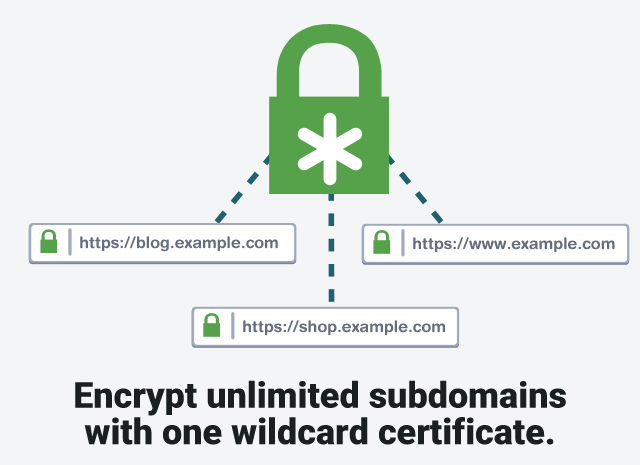
In 2026, protecting multiple online presences efficiently is key. Wildcard SSL certificates offer a smart solution for businesses with many subdomains. They use a special asterisk (*) to cover all first-level subdomains under one main domain, like `*.example.com`. This simplifies security and saves money compared to buying individual certificates for each site.
Imagine managing just one certificate for your blog, shop, and support portal. That’s the power of wildcard TLS certificates. It means easier renewals and less worry about a single subdomain’s certificate expiring and causing downtime. This approach is vital for maintaining a professional and secure online image.
| Feature | Description | Cost (Annual Est.) |
|---|---|---|
| Wildcard SSL | Secures unlimited first-level subdomains (*.example.com) | $35 – $50 (DV/OV) |
| Single Domain SSL | Secures one specific domain (www.example.com) | $15 – $30 |
| Multi-Domain (SAN) SSL | Secures multiple distinct domains and subdomains | $70 – $200+ |
What Is a Wildcard SSL Certificate
A wildcard SSL certificate is a digital certificate that uses an asterisk (*) in the Common Name (CN) field. This asterisk acts as a placeholder for any first-level subdomain. For instance, a certificate for `*.example.com` will automatically secure `mail.example.com`, `shop.example.com`, and `api.example.com`. This offers immense convenience for managing security across a diverse online infrastructure.
Read also: Fix Exchange Errors: Get a Comodo UCC SSL for $45
The primary function is to provide broad coverage with a single certificate. This simplifies installation, renewal, and management, reducing the administrative burden on IT teams. It ensures that all your subdomains are protected by strong encryption, maintaining user trust and data integrity. This makes it a popular choice for businesses that frequently add new subdomains.
Wildcard SSL certificates are limited to securing only the first level of subdomains. They do not cover subdomains deeper than one level, such as `staging.dev.example.com`.
Wildcard SSL vs SAN SSL: Key Differences
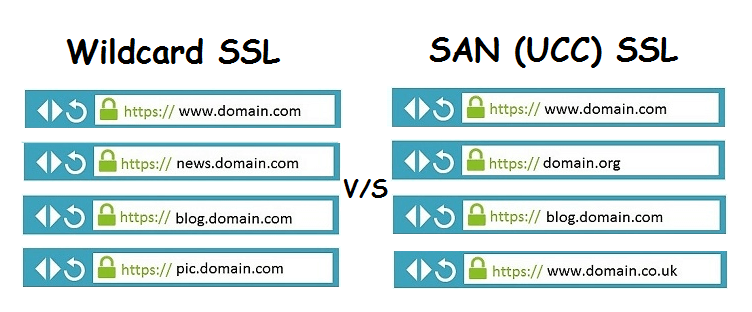
While both wildcard and Multi-Domain (SAN) SSL certificates can secure multiple hostnames, they differ in scope and application. A wildcard SSL certificate, often called an asterisk SSL certificate, secures all first-level subdomains of a single domain. A SAN (Subject Alternative Name) certificate, however, can secure a mix of different domains and subdomains, regardless of their level or relationship.
For example, if you have `example.com`, `www.example.com`, `blog.example.com`, and `shop.example.com`, a wildcard certificate for `*.example.com` covers all of them. If you need to secure `example.com`, `mail.google.com`, and `my-other-site.net`, you would need a SAN certificate. The choice depends entirely on the specific hostnames you need to protect.
How Wildcard SSL Secures Multiple Subdomains
The magic of a wildcard SSL certificate lies in its flexible Common Name (CN) field. When you request a wildcard certificate, you specify `*.example.com`. The asterisk is recognized by browsers and servers as a wildcard character. This means that when a user visits any subdomain under `example.com` (like `blog.example.com`), the server presents the wildcard certificate.
Read also: Cheap Comodo SSL for $3.75 a Year – Here’s How
The browser then checks if the certificate’s CN matches the requested subdomain. Since `blog.example.com` matches the pattern `*.example.com`, the connection is validated and secured with the certificate’s encryption. This process happens seamlessly for every first-level subdomain, providing consistent subdomain security certificate protection.
Important Security Note: A significant risk with wildcard certificates is the shared private key. If one server hosting a subdomain is compromised, the private key could be exposed, potentially compromising all other subdomains secured by that same wildcard certificate. Robust server security is therefore paramount.
DV vs OV Wildcard SSL: Which to Choose
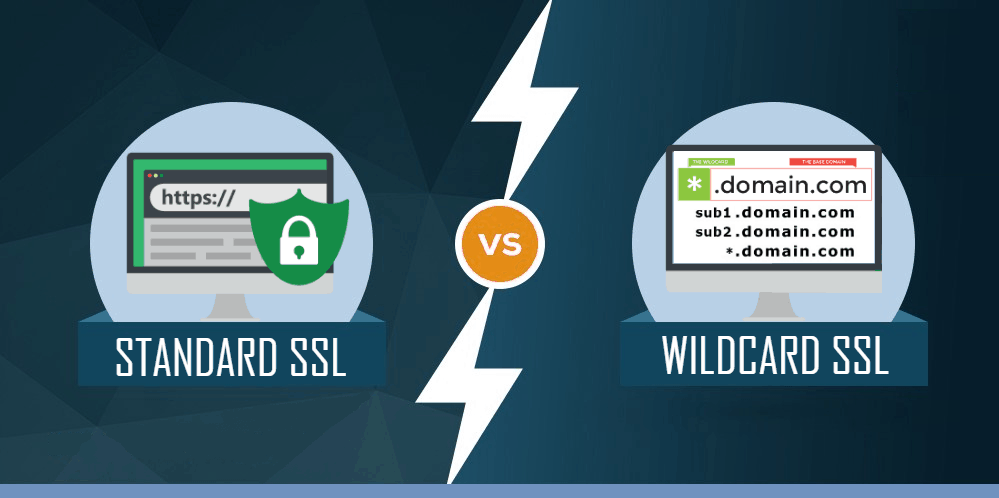
Wildcard SSL certificates are available in two main validation types: Domain Validated (DV) and Organization Validated (OV). DV wildcard SSL certificates offer the fastest and simplest validation process, primarily verifying that you control the domain. They are ideal for blogs, personal websites, or less sensitive applications where the primary need is encryption.
OV wildcard SSL certificates involve a more thorough vetting process, confirming the identity and legitimacy of your organization. This provides a higher level of trust for customers, making OV certificates suitable for e-commerce sites, financial portals, or any application handling sensitive customer data. Extended Validation (EV) wildcard certificates are not available due to industry restrictions.
- DV Wildcard SSL: Quick validation, focuses on domain control.
- OV Wildcard SSL: Stricter validation, verifies organization identity, builds more trust.
Benefits of a Cheap Wildcard SSL
Opting for a cheap wildcard SSL certificate can offer substantial cost savings, especially for growing businesses or those with extensive subdomain structures. Instead of purchasing individual SSL certificates for each subdomain, which can quickly add up, a single wildcard certificate covers them all. This consolidation significantly reduces the overall expenditure on SSL security.
Beyond the direct cost reduction, the simplified management also translates into saved time and resources. Fewer certificates mean fewer renewals to track, fewer installations to perform, and less administrative overhead. This efficiency allows IT staff to focus on other critical security tasks rather than routine certificate management. It’s a practical solution for budget-conscious organizations needing robust multi-subdomain SSL protection.
You can find affordable options from reputable providers. For example, Namecheap offers wildcard certificates starting around $35 annually. Sectigo also provides competitive pricing for their wildcard offerings. Always compare features and validation levels to ensure you get the best value for your specific needs.
Installing a Wildcard SSL on Your Server
Installing a wildcard SSL certificate involves similar steps to installing a single-domain certificate, but with a crucial difference in the private key. When you generate a Certificate Signing Request (CSR), ensure it is correctly formatted for a wildcard domain. The private key generated during this process will be used by all servers hosting subdomains covered by this certificate.
After obtaining the signed certificate from your Certificate Authority (CA), you will upload the certificate files (certificate, private key, and any intermediate certificates) to your web server. The configuration process varies depending on your server software (e.g., Apache, Nginx, IIS). It’s vital to ensure the private key is stored securely and access is strictly limited to authorized personnel.
Common Mistake: Failing to secure the private key adequately. Since this single key protects all your subdomains, its compromise is catastrophic. Implement strict access controls and consider using hardware security modules (HSMs) for enhanced protection if your budget allows.
Wildcard TLS Certificate Renewal Tips
Renewing your wildcard TLS certificate is a critical process to maintain uninterrupted security. Since a wildcard certificate covers multiple subdomains, letting it expire can lead to widespread service disruptions. Most CAs will notify you well in advance of the expiration date, but it’s your responsibility to act promptly.
The renewal process typically involves generating a new CSR, submitting it to your CA along with your existing certificate details, and then re-installing the renewed certificate on your server. Some CAs may offer automated renewal options, but always verify the process and ensure the correct certificate details are used. Remember that wildcard certificates cannot be reissued to cover deeper subdomains; you would need a new certificate for that.
Pro Tip: Set calendar reminders for certificate expiration dates at least 60 days in advance. This buffer period allows ample time for any unexpected issues during the renewal and re-installation process.
Common Misconfigurations with Asterisk SSL
Misconfiguring an asterisk SSL certificate can lead to security vulnerabilities or website errors. A frequent mistake is attempting to use a wildcard certificate for second-level subdomains (e.g., `dev.blog.example.com` with `*.example.com`). Remember, wildcards only apply to the first level.
Another common pitfall is improper installation, where the certificate or its intermediate chain is not correctly configured on the server. This can result in browser warnings like ‘Not Secure’ or connection errors. Always test your installation thoroughly after applying the certificate to ensure all subdomains are being served correctly and securely.
Avoid This Error: Do not install the same wildcard certificate on servers that do not share the same level of security. A breach on a less secure server can compromise the entire wildcard certificate.
Impact and Verdict
In 2026, wildcard SSL certificates remain an indispensable tool for organizations seeking efficient and cost-effective subdomain security. Their ability to secure an unlimited number of first-level subdomains with a single certificate simplifies management and reduces overhead. While the shared private key necessitates stringent server security, the benefits of simplified administration and cost savings are compelling.
For businesses with a dynamic or extensive subdomain structure, a wildcard SSL certificate is often the most practical choice. It provides essential encryption and builds user trust across multiple online touchpoints. Always weigh its limitations, particularly regarding deeper subdomain coverage and the shared key security implications, against your specific needs and compare it with SAN certificates for a fully informed decision.
Read also: Get a Namecheap SSL promo code for up to 55% off in 2026
Your Wildcard SSL Quick Action Plan
Step 1: Audit Your Subdomains
List every subdomain you currently have or plan to create under your primary domain.
Wildcard SSL only covers first-level subdomains like blog.example.com, not deeper levels.
Step 2: Choose Your Validation Level
Decide between Domain Validation (DV) for speed or Organization Validation (OV) for higher trust.
Remember, Extended Validation (EV) is not available for wildcard certificates.
Step 3: Secure Your Private Key
Since one key protects all subdomains, store it in a hardware security module (HSM) or a secure vault.
Regularly rotate the key and revoke the certificate if any server is compromised.
Frequently Asked Questions
Can a wildcard SSL secure second-level subdomains like dev.blog.example.com?
No, wildcard certificates only cover one level of subdomains. For deeper levels, you need individual certificates or a multi-domain SAN certificate.
Is it safe to use a wildcard SSL across multiple servers?
It is safe if you protect the private key rigorously. A breach on any server could expose all subdomains covered by that certificate.
Why can’t I get an EV wildcard SSL?
Industry standards and CA policies prohibit EV validation for wildcard certificates due to the shared key model. Only DV and OV are available.
Wildcard SSL remains a powerful, cost-effective solution for securing an unlimited number of first-level subdomains under one domain. By understanding its limitations and implementing strong key management, you can maintain both security and operational efficiency.
Now, assess your current subdomain landscape and choose a reputable Certificate Authority like DigiCert or Sectigo to purchase your wildcard SSL. Next, explore how automated certificate management tools can further simplify renewal and deployment across your infrastructure.
Imagine a future where every new subdomain you spin up is instantly encrypted without manual intervention—that is the promise of a well-deployed wildcard SSL. Your digital ecosystem can grow seamlessly, protected by a single, robust certificate.
