


Using a free Gmail or Yahoo address for your business can actually cost you customers. It screams ‘hobby’ not ‘professional,’ and that first impression matters more than you think.
A real business email address uses your own domain name, like [email protected]. It builds trust instantly and makes you look established, even if you are just starting out.
Your Options for a Professional Business Email in 2026
The best way to get a business email is to first buy a domain name (like yourcompany.com) from a registrar like Namecheap or Google Domains. Then you connect that domain to an email service that lets you create mailboxes with your custom address.
For a budget-friendly start, Zoho Mail offers a forever-free plan for up to 5 users with your own domain. If you want the full Google or Microsoft experience, Google Workspace starts at $6 per user per month with a 14-day free trial, while Microsoft 365 Business Basic gives you a one-month free trial and includes advanced security.
Another easy option is Neo Mail, which bundles a free domain and AI website builder for about $2 a month. Many web hosts like Hostinger also include free business email with their hosting plans, saving you money if you need a website too.
Your Business Email in 2026: Professional and Powerful
Getting a business email address is key. It makes your company look serious. In 2026, this means using your own domain name. Think `[email protected]`. This builds trust with customers. Free emails like @gmail.com just don’t cut it anymore for serious business. It’s about credibility. Here’s a quick look at costs.
| Service | Starting Price (per user/month) | Free Trial | Notes |
|---|---|---|---|
| Google Workspace | $6 | 14 days | Includes Google apps. |
| Microsoft 365 | Varies | 1 month | Advanced security features. |
| Zoho Mail | $0.95 | N/A (Free tier available) | Great for small teams. |
| Neo Mail | $1.99-$2.00 | N/A | Often includes a free domain. |
| Web Hosting Bundles | Varies (often included) | Varies | Cost-effective if you need a website. |
Own Your Domain. Own Your Email.
A professional business email address needs a domain name. This is your unique web address, like `yourcompany.com`. You must own this first. It’s the foundation for your custom domain email. Without it, you can’t have a branded email. This is standard practice in 2026. Many services help you get both a domain and email. This is how you get an email address for your business.
How to Get a Business Email Address
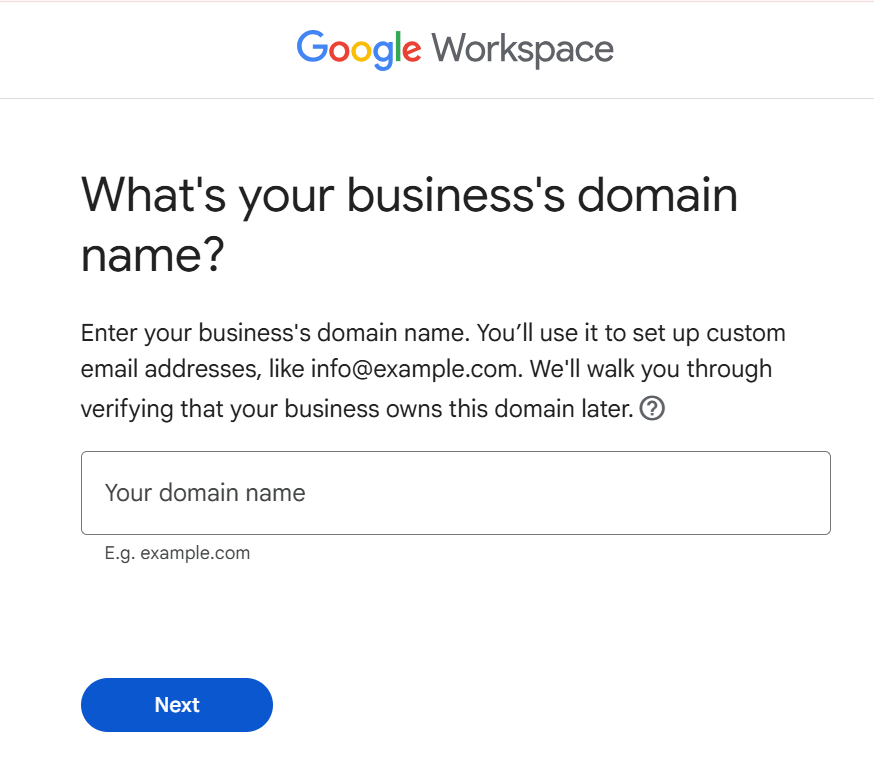
First, you need a domain name. If you don’t have one, register it. Namecheap or GoDaddy are popular choices. Then, pick an email provider. Google Workspace and Microsoft 365 are top-tier options. Zoho Mail offers a great free plan for small businesses. Neo Mail is also a good beginner choice. The setup involves linking your domain to the email service. This uses DNS records. It’s a technical step but manageable. This process ensures your email is tied to your domain.
Read also: Stop Typing Reports All Night: EZ Home Inspection Software Does It in Minutes
Free Business Email Options
Yes, free business email is possible. Zoho Mail offers a forever-free plan. It works for up to five users. You must already own a domain name. Neo Mail sometimes bundles a free domain. This makes it very affordable. These free options are good for startups. They let you test the waters. However, they might have fewer features. Consider your long-term needs. Free is good, but paid plans offer more.
Affordable Email Hosting for Small Business
Small businesses need budget-friendly solutions. Zoho Mail’s paid plans start very low. They cost about $0.95 per month. Many web hosting companies include email. Hostinger and Bluehost offer this. If you are building a website, this is smart. You get hosting and email together. This saves money. It is a cost-effective option. Look for bundles that fit your budget.
Setting Up Email with Your Domain
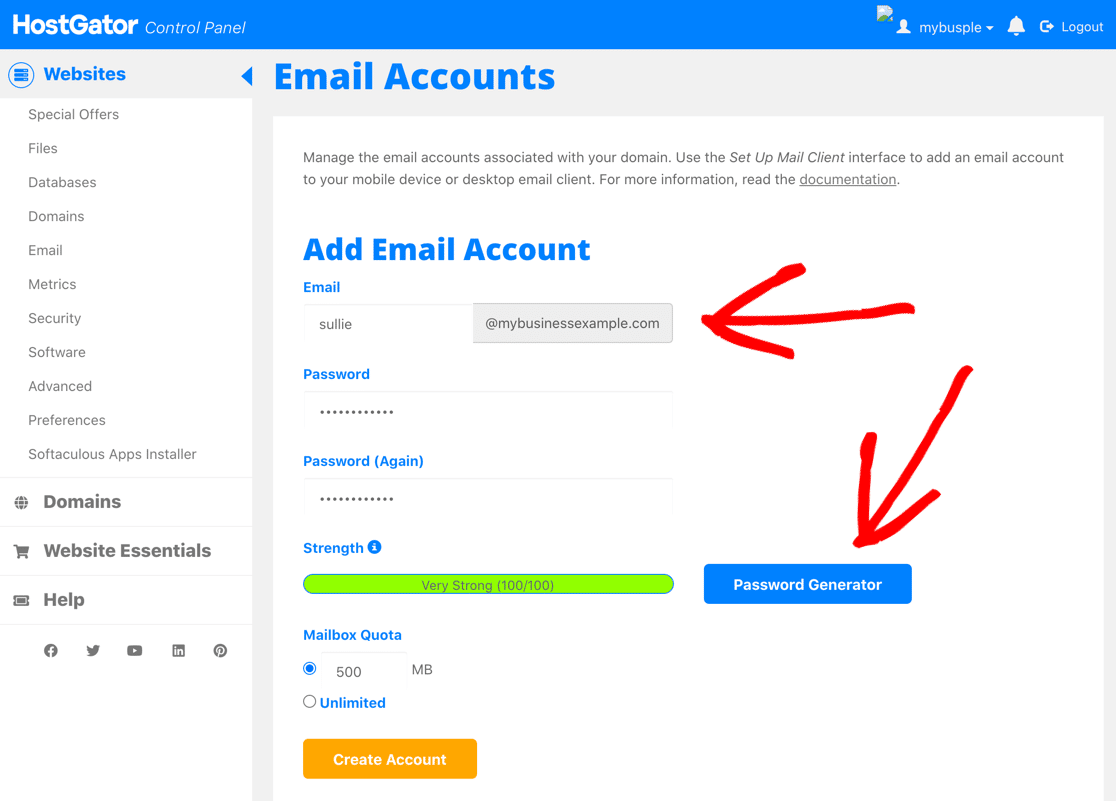
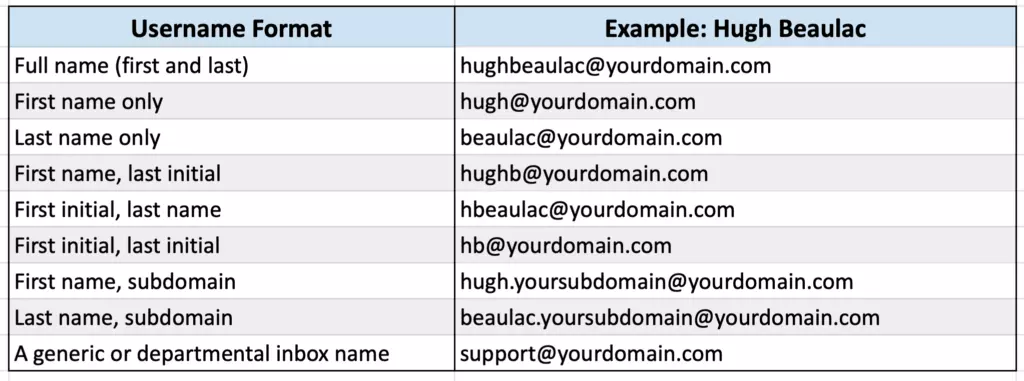
Setting up email with your domain is crucial. You will need to verify your domain. This is done through DNS settings. Your email provider will guide you. They provide records you add to your domain registrar. This proves you own the domain. Then, you create your email accounts. Use formats like `[email protected]`. Or `[email protected]`. This step connects your domain to your email service. It makes your professional email work.
Branded Email Address Benefits
A branded email address looks professional. It shows you are serious about your business. Customers trust companies with custom domains. It boosts your brand recognition. Using @gmail.com can look amateur. It might make people question your legitimacy. A custom domain email is an investment. It pays off in trust and perception. This is vital for business growth.
Read also: How to Start an Amazon Seller Account in 2026 (No Fluff)
Choosing the Right Email Hosting Provider
Consider your needs and budget. Google Workspace and Microsoft 365 are powerful. They offer many integrated tools. Zoho Mail is very cost-effective. It’s great for small teams. Neo Mail is simple to set up. Web hosting bundles are good if you need a website. Read reviews. Look at pricing carefully. Some providers, like GoDaddy, have mixed reviews on price. Choose what fits your workflow best. The right provider makes a difference.
Domain Name for Business Email
Your domain name is your digital identity. Choose one that is memorable. Keep it related to your business name. Shorter is usually better. Avoid hyphens or numbers if possible. You can buy domain names from registrars. Namecheap is a popular, affordable option. Buying a domain is the first step. It’s essential for your custom domain email. This is where your business lives online.
Requirements for a Business Email
The main requirement is a domain name. You then need an email hosting service. This service connects to your domain. You will need to manage DNS records. This is a technical step. Most providers offer easy-to-follow guides. You also need to decide on your email format. Common formats include `info@`, `support@`, or `firstname@`. These are the basic needs for a professional setup.
Expert Verdict: Your Email is Your Digital Handshake
In 2026, a professional email is non-negotiable. It’s your first impression. Using a custom domain email builds instant credibility. Don’t use free consumer emails for your business. It’s like wearing pajamas to a job interview. For affordable options, Zoho Mail and Neo Mail are excellent. If you need more features, Google Workspace or Microsoft 365 are strong. If you’re building a website, check your web host’s email offerings. Setting up is straightforward with good guides. Get your branded email address today. You can get started with email hosting for business at Zoho Mail. For a comprehensive look at professional email, explore options like GoDaddy. Your business deserves a professional email.
Read also: Make an Invoice Online Free in 2 Minutes (No Sign-Up)
Your 3-Step Action Plan to Get a Business Email Today
Step 1: Secure Your Domain Name
Your domain is your digital storefront. If you don’t own one yet, register it immediately through a registrar like Namecheap or Google Domains for around $10–$12 per year.
Choose a name that matches your business name for consistency. Avoid hyphens or numbers that can confuse customers.
Step 2: Pick Your Email Provider
For a free option with up to five users, sign up for Zoho Mail’s forever-free plan using your own domain. If you need full integration with office tools, start a 14-day free trial of Google Workspace at $6 per user per month.
For the easiest setup with a bundled domain, try Neo Mail at $1.99 per month. It includes an AI website builder and a free custom domain.
Step 3: Set Up Your Mailboxes
After choosing a provider, verify your domain ownership by adding the provided DNS records (TXT or MX) through your domain registrar’s control panel. Then create your professional email addresses, such as [email protected] or [email protected].
Configure your email client (Outlook, Apple Mail, or the provider’s webmail) to start sending and receiving. Test by sending a message from your new address to a personal account.
Frequently Asked Questions
Can I use a free email like Gmail for my business?
Technically yes, but it hurts your credibility. A custom domain email builds trust and makes you look established.
Free consumer accounts also lack professional features like catch-all aliases and 24/7 support.
What is the cheapest way to get a business email?
The most economical route is Zoho Mail’s free plan for up to five users, provided you own a domain. If you need more features, Neo Mail at $1.99/month includes a domain and email.
Alternatively, many web hosts like Hostinger bundle free email accounts with their hosting packages.
How long does it take to set up a business email?
Registering a domain takes a few minutes, and setting up email with a provider can be done in under an hour. DNS propagation may take up to 48 hours, but you can often start sending and receiving within 30 minutes.
Providers like Neo Mail and Google Workspace offer guided wizards that simplify the process for beginners.
Choosing a professional business email is a small investment with a huge return in trust and credibility. Every serious business owner makes this move early.
Start your free trial or sign up for a budget-friendly plan today. Your future clients will notice the difference.
Imagine a sleek inbox that matches your brand, seamlessly connecting with your calendar and contacts. That polished efficiency is now within your reach.
