


Is your Microsoft Exchange server prompting certificate errors that scare your users? That flashing warning means email autodiscover and Outlook connectivity are broken. A Comodo UCC SSL is the specific fix for this exact pain point.
Unified Communications Certificates (UCC) are built to secure multiple hostnames like mail.yourcompany.com and autodiscover.yourcompany.com under one certificate. Without it, you either juggle many certs or leave your users with scary browser warnings.
What is Comodo UCC SSL and Why Your Exchange Server Needs It
A Comodo UCC SSL (now often sold as Sectigo UCC) is a multi-domain certificate designed for Microsoft Exchange, Office Communications Server, and Skype for Business. It protects up to 250 SANs, covering all your required FQDNs like yourcompany.com, mail.yourcompany.com, and autodiscover.yourcompany.com.
Unlike a standard wildcard SSL that secures only *.yourcompany.com, a UCC certificate handles multiple distinct domains and hostnames. This makes it the only practical choice for on-premises Exchange deployments where you need to secure both internal and external names.
Pricing in 2026 starts around $45 per year for a basic UCC with a few SANs from providers like SSLs.com. You can install it on unlimited servers at no extra cost, giving you flexibility for load balancing or failover setups.
Securing Your Communications: The Power of Comodo UCC SSL in 2026
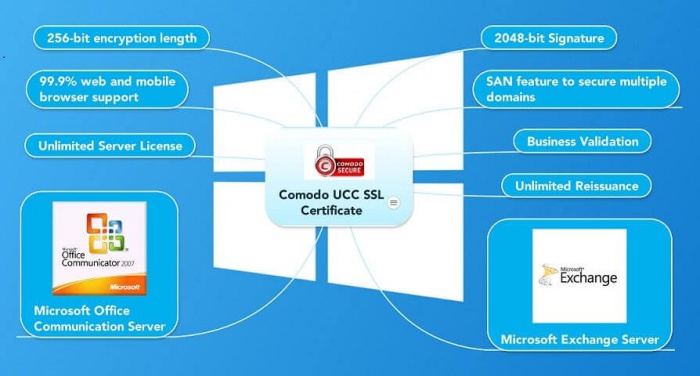
In today’s digital landscape, safeguarding your business communications is paramount. For organizations relying on Microsoft Exchange and Office Communications Server, a robust SSL certificate is not just a recommendation; it’s a necessity. Comodo UCC (Unified Communications) SSL certificates, now often recognized under the Sectigo brand, provide a comprehensive solution for encrypting sensitive data and authenticating your servers.
These certificates are specifically designed to handle the complexities of modern communication platforms. They allow you to secure multiple domain names and hostnames with a single installation, significantly simplifying management and reducing costs. This makes them an indispensable tool for IT administrators aiming for both security and efficiency in their server environments.
| Feature | Details |
|---|---|
| Certificate Type | Comodo UCC (Unified Communications) SSL, now often Sectigo UCC SSL |
| Primary Use | Securing Microsoft Exchange and Office Communications Server |
| Key Technology | Subject Alternative Names (SANs) to secure multiple FQDNs/hostnames |
| SAN Capacity | Typically up to 250 SANs per certificate |
| Encryption Strength | 256-bit encryption, 2048-bit RSA/ECC signature keys |
| Browser Compatibility | Over 99.9% of browsers and mobile devices |
| Validation Types | Domain Validated (DV) and Organization Validated (OV) |
| Server Installation | Unlimited physical servers at no additional cost |
| Estimated Annual Cost (2026) | Starting around $45-$50 for basic, higher for advanced packages |
What Is a Comodo UCC SSL Certificate
A Comodo UCC SSL certificate, also known as a Comodo Multi-Domain SSL or Comodo SAN Certificate, is a type of SSL certificate that allows you to secure multiple fully qualified domain names (FQDNs) and hostnames using a single certificate. This is achieved through the use of Subject Alternative Names (SANs), which are essentially additional identities added to the certificate beyond the primary domain name.
Read also: Cheap Comodo SSL for $3.75 a Year – Here’s How
Instead of purchasing separate certificates for each domain or subdomain, you can consolidate them under one UCC certificate. This is particularly beneficial for businesses with diverse online presences or those running complex server environments like Microsoft Exchange, where multiple internal and external hostnames need protection.
Comodo UCC SSL vs Standard SSL: Key Differences
The primary distinction lies in flexibility and scope. A standard SSL certificate typically secures a single domain name (e.g., `yourcompany.com`) and sometimes its immediate subdomains via a wildcard. A Comodo UCC SSL certificate, however, is built from the ground up to secure multiple, distinct domain names and hostnames simultaneously.
This multi-domain capability is managed through SANs. While a standard SSL might only cover one FQDN, a UCC certificate can cover dozens or even hundreds, making it far more efficient for managing security across various services and brands under a single organization. This simplifies certificate management and reduces the administrative overhead significantly.
How Comodo UCC SSL Secures Microsoft Exchange
Microsoft Exchange Server relies heavily on secure communication channels for email, calendaring, and collaboration. A Comodo UCC SSL certificate is essential for securing these services, especially for external access via Outlook Web App (OWA) or ActiveSync. By covering hostnames like `mail.yourcompany.com`, `autodiscover.yourcompany.com`, and `owa.yourcompany.com` with a single certificate, it ensures encrypted connections for all these critical functions.
This prevents man-in-the-middle attacks and protects sensitive data exchanged between clients and the Exchange server. The ability to install it on unlimited servers is also a major advantage for larger Exchange deployments, ensuring consistent security across all your mail infrastructure without incurring extra licensing fees for the certificate itself.
Comodo UCC SSL for Office Communications Server
Similar to Exchange, Office Communications Server (OCS) and its successor, Lync/Skype for Business, require strong SSL encryption for real-time communication services like instant messaging, voice, and video calls. A Comodo UCC SSL certificate provides the necessary security for these platforms.
It allows administrators to secure multiple hostnames associated with OCS, such as `sip.yourcompany.com` and `lyncdiscover.yourcompany.com`. This ensures that all communication streams are encrypted, protecting the privacy and integrity of user interactions and confidential business discussions.
Benefits of Sectigo UCC SSL Certificate
As Comodo’s SSL business evolved, many products are now branded under Sectigo. A Sectigo UCC SSL certificate offers the same robust security and multi-domain capabilities. The key benefits include simplified management, cost savings by consolidating multiple certificates into one, and enhanced security with strong encryption standards.
These certificates provide visual trust indicators, assuring users that their connection is secure and their data is protected. For businesses, this translates to increased customer confidence and a stronger online reputation. The validation levels, like Organization Validated (OV), add an extra layer of trust by verifying your organization’s identity.
Cheap Comodo UCC SSL: Cost-Effective Security
While premium certificates can be expensive, finding a cheap Comodo UCC SSL is achievable, especially in 2026. Providers like SSLs.com often offer competitive pricing, with basic UCC certificates starting around $45-$50 annually. These entry-level options typically include a few SANs, which can be sufficient for many small to medium-sized businesses.
When comparing prices, always check how many SANs are included and the validation level offered. Even a more affordable certificate provides essential 256-bit encryption and 2048-bit keys, ensuring strong security without breaking the bank. It’s about finding the right balance between cost and the specific security needs of your unified communications infrastructure.
Comodo UCC Wildcard SSL: Multi-Domain Flexibility
For even greater flexibility, a Comodo UCC Wildcard SSL certificate combines the power of multi-domain security with wildcard functionality. This means you can secure multiple distinct domains (e.g., `yourcompany.com`, `yourbusiness.net`) and, for each of those domains, also secure all of its immediate subdomains (e.g., `*.yourcompany.com`, `*.yourbusiness.net`).
This type of certificate is ideal for large organizations or resellers managing numerous domains and subdomains. It offers the ultimate in convenience and cost-effectiveness, reducing the number of certificates needed to near one. It’s a powerful tool for comprehensive security coverage across a diverse digital footprint.
Installing a Comodo SAN Certificate on Exchange
Installing a Comodo SAN Certificate (another name for UCC) on Microsoft Exchange involves several steps, typically managed through the Exchange Management Console or PowerShell. First, you generate a Certificate Signing Request (CSR) on your Exchange server, specifying all the FQDNs and hostnames you need to secure.
Once the CSR is generated, you submit it to the Certificate Authority (CA) along with your order for the UCC certificate. After validation, the CA issues the certificate, which you then import back into Exchange. Finally, you bind the imported certificate to the relevant Exchange services, such as IIS (for OWA) and SMTP, ensuring all traffic is encrypted. Proper installation is critical for the certificate to function correctly and provide security.
The Verdict: Essential Security for Modern Communications
In 2026, the need for secure unified communications infrastructure is undeniable. Comodo UCC SSL certificates, whether under the original branding or as Sectigo UCC SSL, remain a cornerstone for protecting Microsoft Exchange and Office Communications Server environments. Their ability to secure multiple domains and hostnames with a single certificate offers unparalleled convenience and cost-efficiency.
While the market offers various SSL options, the specific design of UCC certificates makes them uniquely suited for these complex server applications. For IT administrators, investing in a Comodo UCC SSL certificate is a strategic decision that enhances security, builds trust, and ensures the smooth, protected operation of vital business communications. The value they provide, especially with unlimited server installations, solidifies their essential role in today’s digital security framework.
Your 3-Step UCC SSL Action Plan
Step 1: Map Your Domains
List every fully qualified domain name your Exchange or Office Communications Server needs. Include mail.yourcompany.com, autodiscover.yourcompany.com, and any additional hostnames.
Step 2: Choose Your Certificate Type
Select a Comodo UCC SSL for up to 250 SANs or a hybrid UCC Wildcard if you need subdomain coverage. Domain Validation (DV) is fastest; Organization Validation (OV) adds business verification.
Step 3: Install on All Servers
One certificate covers unlimited physical servers at no extra cost. Install it on your Exchange, OCS, and any backup servers to ensure consistent encryption.
Frequently Asked Questions
Can I use a UCC certificate on a single domain?
Yes, a UCC certificate works on a single domain, but it is overkill if you only need one hostname. A standard SSL would be more cost-effective.
How do I add more SANs after purchase?
You can reissue the certificate to add or remove SANs at any time during its validity period. This process is usually free with most vendors.
Does a UCC certificate work with all browsers?
Yes, Comodo UCC certificates are trusted by over 99.9% of browsers and devices. They use 256-bit encryption and 2048-bit RSA keys for maximum compatibility.
Comodo UCC SSL certificates remain the gold standard for securing unified communications in 2026. Their ability to cover multiple domains and unlimited servers makes them indispensable for IT administrators.
Assess your organization’s needs and choose between DV for speed or OV for trust. Then, map your hostnames and install your certificate today.
Imagine a future where every email, calendar, and contact sync is encrypted seamlessly. That future starts with the right UCC certificate now.
