


Running out of blank W-2 forms days before the January 31st deadline is every employer’s nightmare. You need a quick, reliable source for blank W-2 forms that work with your payroll system and meet IRS standards. Whether you’re printing on plain paper or using perforated sheets, the wrong choice can mean penalties and reprinting costs.
Many small business owners overpay for blank W-2 forms or buy incompatible paper that jams their printer. This article cuts through the confusion, showing you exactly where to get blank W-2 forms, how to choose between digital and physical options, and what the IRS actually requires in 2026. No fluff, just the facts you need to get your W-2s out on time.
Where to Get Blank W-2 Forms: Digital Templates vs. Perforated Paper
The IRS offers a free fillable W-2 form PDF on its website, which you can download and complete manually. For a more efficient workflow, services like pdfFiller let you type data directly into the form and even e-sign it. This digital route is ideal if you only have a few employees and don’t want to buy physical paper.
For larger batches, perforated W-2 paper is the standard choice. Vendors like Discount Tax Forms, EZ Checks, and Formstax sell multi-up sheets (3 or 4 forms per page) that feed smoothly through most printers. You can also find all-in-one kits with matching security envelopes at Staples, Office Depot, or through Intuit’s marketplace. These kits simplify mailing because the envelope window lines up perfectly with the employee address.
Getting Your Blank W2 Forms in 2026: A Practical Guide

As an employer in 2026, securing the correct blank W2 forms is a crucial step in tax season compliance. You have reliable options, whether you prefer digital convenience or the traditional feel of physical paper. The IRS itself offers the official Form W2 PDF, a solid starting point for manual entry or as a foundation for fillable digital templates. These digital tools streamline data input and electronic signing, making the process more efficient.
For those who need physical forms, specialized perforated W2 paper is available. This paper is designed to work seamlessly with popular payroll software like QuickBooks and Sage. You can find these forms in multi-up sheets, typically 3 or 4 per page, from dedicated tax form vendors. Many also bundle these with security envelopes, simplifying the mailing to your employees.
| Option | Description | Availability |
|---|---|---|
| Digital Templates | Fillable PDFs, online services | IRS website, pdfFiller |
| Physical Perforated Paper | 3-up or 4-up sheets | Tax form vendors, office supply stores |
| Plain Paper Printing | Requires adherence to IRS specs | Payroll software features |
Where to Buy Blank W2 Forms
Finding blank W2 forms is straightforward. You can purchase them from specialized tax form vendors online, such as Discount Tax Forms and EZ Checks. These suppliers often provide various formats, including multi-up sheets and kits with envelopes. Major office supply retailers like Staples and Office Depot also carry these essential tax forms. Consider vendors that offer all-in-one kits for added convenience.
Printable Blank W2 Forms

If you need printable blank W2 forms, the IRS provides an official Form W2 PDF. This can be downloaded and printed for manual completion. For a more professional look and easier data management, consider using this PDF as a base for fillable templates. Many online services allow you to fill out the form digitally and then print it. This is a good option for smaller businesses that may not use complex payroll software.
The key is to ensure any printed form, whether from a template or software, meets IRS specifications for clarity and layout.
Fillable W2 Form PDF
A fillable W2 form PDF offers significant advantages in speed and accuracy. Services like pdfFiller allow you to input employee data directly into an electronic W2 form. This reduces the chance of manual entry errors. Once filled, you can save the document or print it for distribution. This digital approach is becoming increasingly popular for its efficiency and ease of use.
W2 Forms for Payroll Software
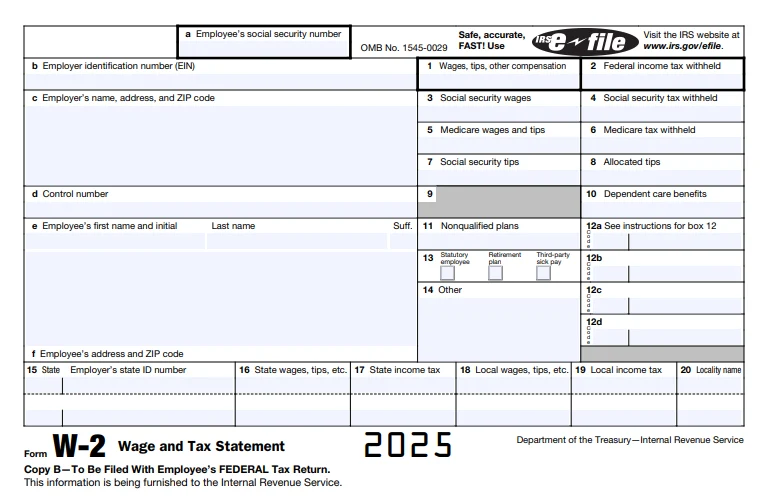
If you use payroll software such as QuickBooks or Sage, you’ll want W2 forms designed for compatibility. These are often available as perforated paper that prints directly from your software. The software handles the data population, and the perforated paper ensures clean separation of employee copies. Purchasing W2 forms specifically for your software can save considerable time during tax preparation.
Perforated W2 Paper for Printing
Perforated W2 paper is essential when printing from accounting or payroll systems. This paper has pre-scored lines, allowing you to easily separate the individual W2 forms after printing. It’s typically sold in sheets with multiple forms (e.g., 3-up or 4-up) designed to fit standard envelopes. Ensure the paper you buy is compatible with your specific printer and software output.
Always verify that the perforated paper you choose is designed to meet IRS standards for size and layout.
Download W2 Form Template
Downloading a W2 form template is a common starting point. The IRS website offers the official Form W2 PDF for download. You can also find various W2 form templates online from third-party providers. These templates can be either static PDFs for printing or dynamic, fillable forms. Choosing a template from a reputable source ensures you are using a current and compliant version.
IRS W2 Form Paper Requirements
The IRS has specific requirements for W2 form paper, especially if you choose to print on plain paper. While perforated paper is common, the IRS does allow printing on standard 8.5′ x 11′ paper using compatible software, provided the output meets strict guidelines. These guidelines ensure that necessary information is visible through standard double-window envelopes. Always refer to the latest IRS publications for precise specifications.
Print W2 Forms on Plain Paper
Printing W2 forms on plain paper is an option in 2026, but it requires careful attention to IRS guidelines. Your payroll system must be capable of generating output that aligns with the IRS’s specifications for plain paper printing. This includes correct spacing and placement of information so it aligns with envelope windows. Intuit QuickBooks, for example, provides guidelines for this process. Ensure your printer and software are set up correctly to avoid errors.
Failure to meet the IRS specifications for plain paper printing can lead to rejected forms and potential penalties.
The Future of Blank W2 Forms in 2026: Expert Verdict
In 2026, the trend is clearly towards digital efficiency for W2 forms. While physical perforated paper remains a viable and necessary option for many, fillable PDF templates and direct software integration are gaining prominence. Employers should prioritize solutions that minimize manual data entry and reduce the risk of errors. Staying updated with IRS guidelines for both digital and physical forms is paramount to ensure timely and accurate filing, avoiding penalties.
Your 3-Step Action Plan for Blank W-2 Forms
Step 1: Choose Your Format
Decide between digital templates or physical perforated paper based on your workflow. Digital options like the IRS PDF or pdfFiller allow easy data entry and electronic signatures.
Step 2: Source Your Forms
For physical forms, order from trusted vendors like Discount Tax Forms or Staples. Ensure the paper is compatible with your payroll software (QuickBooks, Sage).
Step 3: Print and Distribute
Use plain paper if your printer can align addresses with envelope windows. File electronically with the SSA by January 31 to avoid penalties.
Frequently Asked Questions
Can I use plain paper to print W-2 forms?
Yes, as long as the output meets IRS specifications for address visibility through envelope windows. Intuit’s Plain Paper Guidelines provide detailed setup instructions.
Where can I buy blank W-2 forms locally?
Major office supply stores like Staples and Office Depot carry them during tax season. You can also visit an IRS Taxpayer Assistance Center for physical copies.
What is the deadline for giving W-2s to employees?
You must furnish Copy B, C, and 2 to employees by January 31. The SSA requires electronic filing of Forms W-2 and W-3 by the same date.
Choosing the right blank W-2 form ensures compliance and smooth payroll processing. Digital templates offer flexibility, while physical paper provides a traditional, reliable option.
Evaluate your needs and order early to avoid last-minute rush. Use the tips above to streamline your tax form workflow.
As tax technology evolves, expect more integrated solutions that simplify filing. Stay ahead by adopting digital tools that reduce errors and save time.
